How Trees Organize Hierarchical Data
Many types of information naturally exist in levels. A company has departments, departments have teams, and teams have employees. A computer has folders containing files and subfolders. A website has pages organized under categories, while a database may contain records connected through different relationships.
When data has this kind of parent-and-child structure, a tree can provide an efficient way to represent and work with it.
In programming, a tree is a data structure made up of connected elements called nodes. Each node can contain data and links to other nodes. The structure begins with a top-level node and branches downward into related elements.
Trees are useful because they mirror the way many real-world systems are organized. Instead of placing every piece of information into a flat list, a tree represents relationships between items and makes those relationships easier for software to navigate.
What Is a Tree Data Structure?
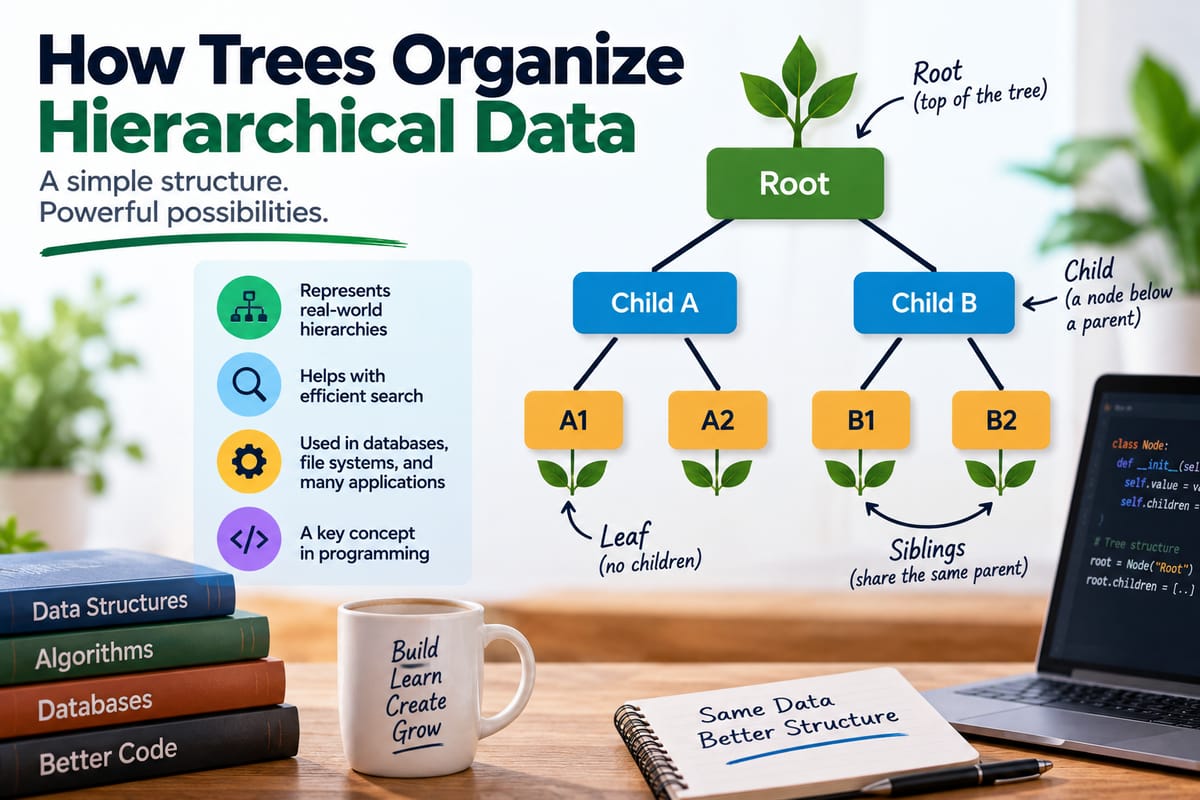
A tree is a hierarchical data structure consisting of nodes connected by edges.
A basic tree might look like this:
        Root
        /    \\
    Child A  Child B
    /   \\       \\
Node A1 Node A2 Node B1
The node at the top is called the root. Nodes below it are connected through parent-child relationships.
Unlike a simple list, where items generally follow one sequence, a tree can branch into multiple paths.
For example:
Company
├── Sales
│ ├── North Region
│ └── South Region
├── Engineering
│ ├── Software
│ └── Hardware
└── Finance
├── Accounting
└── Planning
Each department can have its own children, and those children can potentially have additional descendants.
This makes trees particularly useful for hierarchical information.
Why Hierarchical Data Needs a Special Structure
Some data does not naturally fit into a flat structure.
Consider a computer file system:
Documents
├── Work
│ ├── Reports
│ └── Presentations
├── Personal
│ ├── Photos
│ └── Letters
└── Projects
├── Website
└── Mobile App
A flat list could store all these names, but it would not clearly represent which folder contains which files.
A tree captures both the individual items and their relationships.
The same idea appears in many software systems, which is why understanding data structures is an important part of learning what is programming and how does it work.
The Main Parts of a Tree
Several terms are commonly used when describing trees.
Root
The root is the highest node in a tree.
A tree normally has one root from which the rest of the structure descends.
For example:
   Root
   /    \\
  A      B
Here, Root is the root node.
Parent
A node that directly connects to nodes below it is called a parent.
   Parent
    /    \\
 Child  Child
The upper node is the parent of both lower nodes.
Child
A node directly connected below another node is its child.
A parent can have multiple children depending on the type of tree.
Siblings
Nodes that share the same parent are called siblings.
  Parent
  /  |  \\
 A   B   C
Nodes A, B, and C are siblings.
Leaf
A leaf node has no children.
   Root
   /    \\
  A      B
        / \\
       C   D
A, C, and D are leaves because they do not branch into additional nodes.
Edge
An edge represents the connection between two nodes.
In the example above, the connection between B and C is an edge.
Subtree
A node and all of its descendants can be viewed as a subtree.
For example:
   Root
   /    \\
  A      B
        / \\
       C   D
The structure beginning with B is itself a smaller tree:
 B
 / \\
C   D
Thinking in terms of subtrees becomes particularly useful when designing algorithms that operate recursively.
How Trees Differ From Other Data Structures
Trees are one of several structures programmers can use to organize information.
A list generally represents items in a sequence:
A → B → C → D
A tree represents relationships and branching:
  A
  / \\
 B   C
/ \\
D E
A graph can represent much more general relationships, where nodes may connect in many directions and cycles may exist.
Trees occupy an important middle ground. They provide more structure than a simple sequence while generally imposing more organization than a general-purpose graph.
Choosing among these structures is part of designing effective software.
Binary Trees
One of the most widely studied types of tree is the binary tree.
In a binary tree, each node can have at most two children.
These are often referred to as:
- Left child
- Right child
For example:
     10
     /  \\
    5    15
   / \\     \\
  2   7     20
Each node has no more than two immediate children.
Binary trees are important because they provide the foundation for several specialized data structures and algorithms.
Binary Search Trees
A binary search tree, or BST, organizes values according to an ordering rule.
Typically:
- Values smaller than a node are placed in its left subtree.
- Values larger than a node are placed in its right subtree.
For example:
     50
     /  \\
   30    70
  / \\    / \\
20  40  60  80
This organization can make searching for values efficient when the tree remains reasonably balanced.
To find 60, for example, an algorithm can compare it with 50, move right, compare it with 70, and then move left.
Instead of examining every value, it can eliminate large portions of the structure along the way.
Balanced Trees
A major problem with an ordinary binary search tree is that it can become unbalanced.
Suppose values are inserted in increasing order:
10
\
20
\
30
\
40
The result resembles a linked list rather than a well-branched tree.
Searching this structure can become much less efficient.
Balanced tree structures are designed to keep branches at more appropriate depths.
Examples include:
- AVL trees
- Red-black trees
- B-trees
- B+ trees
These structures use different rules to maintain useful shapes as data is inserted or removed.
Tree Traversal
Once data is organized into a tree, software needs ways to visit its nodes.
The process of systematically visiting nodes is called tree traversal.
Several traversal methods are common.
Depth-First Traversal
Depth-first traversal explores a branch deeply before moving to another branch.
Common depth-first approaches include:
- Preorder
- Inorder
- Postorder
Preorder Traversal
In preorder traversal, a node is processed before its children.
For this tree:
  A
  / \\
 B   C
/ \\
D E
The preorder sequence is:
A → B → D → E → C
Inorder Traversal
Inorder traversal processes the left subtree, then the node, then the right subtree.
For the same tree:
D → B → E → A → C
Inorder traversal is particularly important for binary search trees because it can produce values in sorted order.
Postorder Traversal
Postorder traversal processes the children before the parent:
D → E → B → C → A
This can be useful when a parent depends on work being completed for its descendants first.
Breadth-First Traversal
Breadth-first traversal works differently.
Instead of going as deep as possible, it visits nodes level by level.
For:
     A
    /   \\
   B     C
  / \\   / \\
 D   E F   G
A breadth-first traversal produces:
A → B → C → D → E → F → G
Breadth-first traversal is commonly implemented using a queue.
Recursion and Trees
Trees and recursion are closely related because each subtree has the same basic structure as the larger tree.
Consider:
   A
   / \\
  B   C
 / \\
D   E
The tree rooted at B is itself a tree.
That means a function can often solve a problem by:
- Processing the current node.
- Calling itself on the left subtree.
- Calling itself on the right subtree.
A simplified conceptual example might look like:
process(node):
if node is empty:
return
process(node.left)
process(node.right)
This recursive structure makes many tree algorithms easier to express.
However, recursion also requires careful handling of stopping conditions and potentially deep trees.
Trees in File Systems
Computer file systems are one of the most familiar examples of hierarchical data.
A directory can contain files and additional directories:
Computer
├── Documents
│ ├── Report.docx
│ └── Notes.txt
├── Pictures
│ ├── Vacation
│ └── Family
└── Music
├── Albums
└── Playlists
The root represents the highest level of the hierarchy.
Directories act like intermediate nodes, while files can behave like leaves.
Software can use tree-like structures to navigate directories, display folder contents, search for files, and calculate information about nested folders.
Trees in Web Pages
Web documents can also have hierarchical structures.
An HTML document contains elements nested inside other elements:
<html>
<body>
<main>
<section>
<h1>Article</h1>
<p>Content</p>
</section>
</main>
</body>
</html>
The browser can represent this nested structure as a Document Object Model, commonly known as the DOM.
Elements become related through parent-child relationships.
For example:
html
└── body
└── main
└── section
├── h1
└── p
This structure allows software to navigate and manipulate individual elements within a web page.
Trees in Databases
Trees can also appear in database systems.
Some databases store or work with hierarchical information such as:
- Organizational structures
- Product categories
- Geographic regions
- Comment threads
- File metadata
- Menus
- Permission structures
A category system might look like:
Electronics
├── Computers
│ ├── Laptops
│ └── Desktops
├── Phones
│ ├── Smartphones
│ └── Accessories
└── Audio
├── Headphones
└── Speakers
Hierarchical information can be represented in different ways depending on the database technology and application requirements.
For a broader understanding of how systems store, organize, retrieve, and manage information, see the complete guide to databases.
Trees and Search
One of the major reasons programmers use trees is to make certain searches more efficient.
A poorly structured tree may provide little advantage, but a well-designed search tree can eliminate large portions of the data during a lookup.
Suppose a balanced binary search tree contains thousands of values.
Rather than checking every value sequentially, the search can repeatedly decide whether to move left or right.
This ability to narrow the search space is one reason tree-based structures are important in computer science.
Heaps and Priority Queues
A heap is another specialized tree structure.
Heaps are commonly used to implement priority queues, where the item with the highest or lowest priority needs to be retrieved efficiently.
A min-heap, for example, maintains the smallest value near the top.
A simplified structure might look like:
   2
   / \\
  5   7
 / \\
9   8
The exact arrangement depends on the heap rules.
Heaps are also important in algorithms such as heap sort and can support scheduling and priority-based processing.
Trees in Compilers and Programming Tools
Programming languages and development tools frequently use tree structures internally.
When source code is processed, a compiler or interpreter may transform the text into structures that represent the relationships between different parts of the program.
An expression such as:
a + b * c
has an inherent hierarchy because multiplication is evaluated before addition.
A tree can represent this relationship:
   \+
   / \\
  a   \*
     / \\
    b   c
The structure communicates that b * c forms one component of the larger addition operation.
This kind of representation is useful for analyzing, transforming, and generating code.
Understanding what are programming languages can provide useful context for seeing why these internal representations matter.
Decision Trees
Trees do not have to contain numbers.
A decision tree can represent a sequence of choices.
For example:
            Start
            /     \\
         Yes       No
         /          \\
    Condition A   Condition B
      /   \\          /   \\
    Yes   No       Yes   No
     |     |        |     |
   Action 1 2      3      4
Each branch represents a possible decision.
Decision trees can be used in software systems for classification, rule-based logic, troubleshooting, and other decision-making processes.
Tries and Text Searching
A trie is a specialized tree designed for storing sequences, particularly strings.
For example, words such as:
cat
car
care
can share common prefixes.
A trie might represent them conceptually as:
c
└── a
├── t
└── r
└── e
The shared c and a structure does not need to be duplicated.
Tries can therefore be useful for applications such as:
- Autocomplete
- Dictionary lookup
- Prefix searching
- Spell-checking
- Word filtering
Trees and Algorithms
A data structure is useful because algorithms can operate on it effectively.
Trees are closely connected to algorithms for:
- Searching
- Sorting
- Traversal
- Insertion
- Deletion
- Classification
- Hierarchical processing
Learning algorithms explained alongside data structures helps show how programmers combine organization and computation to solve problems.
The tree determines how information is arranged, while an algorithm determines how the software works with that information.
Time Complexity and Tree Performance
The performance of a tree operation depends heavily on its structure.
For a well-balanced binary search tree, searching can often be performed in approximately O(log n) time.
By contrast, a severely unbalanced tree can degrade toward O(n) for operations such as searching.
This difference demonstrates why tree design matters.
A tree with thousands of nodes may perform very well if its structure allows the algorithm to eliminate large portions of the search space.
The same number of nodes arranged poorly can require substantially more work.
Advantages of Tree Structures
Trees provide several important benefits.
Natural Representation of Hierarchy
Trees closely match the structure of many real-world systems.
Efficient Searching
Certain tree types can support fast searches.
Flexible Branching
A node can have multiple children depending on the tree structure.
Recursive Processing
Subtrees allow many problems to be broken into smaller versions of the same problem.
Organized Data
Relationships between elements are explicit rather than implied by position alone.
Limitations of Trees
Trees are not appropriate for every problem.
Potential challenges include:
- More complex implementation than simple arrays or lists
- Additional memory for links between nodes
- Performance problems in poorly balanced structures
- More complicated insertion and deletion rules for specialized trees
- Recursive algorithms that can become problematic with extremely deep structures
Choosing a tree should therefore be based on the problem being solved rather than treating trees as a universal solution.
Choosing the Right Tree
Different applications benefit from different tree structures.
A programmer might consider:
| Tree type | Common use |
|---|---|
| Binary tree | General hierarchical structures |
| Binary search tree | Ordered searching |
| AVL tree | Balanced searching |
| Red-black tree | Ordered collections with dynamic updates |
| Heap | Priority queues |
| Trie | Prefix and text searching |
| B-tree | Large-scale indexed storage |
| Decision tree | Branching decisions |
The choice depends on factors such as the size of the data, frequency of searches, insertion and deletion requirements, and whether the data has a natural ordering.
Why Trees Matter in Modern Software
Trees are more than an academic concept.
They appear throughout software systems because hierarchical relationships are everywhere.
Operating systems organize files. Browsers represent documents. Compilers analyze source code. Databases manage indexes and hierarchical records. Search systems organize information. Applications use menus and categories. Development tools represent projects and program structures.
Once programmers recognize hierarchical relationships, a tree often becomes an intuitive way to model them.
Turning Hierarchical Information Into Useful Software
Trees provide a structured way to represent information that naturally branches from one level to another.
Their basic concepts—roots, parents, children, siblings, leaves, edges, and subtrees—provide the foundation for more specialized structures used in searching, databases, compilers, file systems, and applications.
The real value of a tree is not simply that it looks like a branching diagram. It is that the structure captures relationships between pieces of information and gives algorithms a predictable way to navigate those relationships.
For developers, understanding trees is therefore an important step toward understanding how software organizes complex information and turns hierarchical relationships into systems that can be searched, processed, and managed efficiently.