What Are Variables in Programming?
Variables are one of the basic building blocks of programming. They allow software to store information, work with changing values, and make decisions based on data. Whether a program is calculating a total, storing a user's name, tracking a score, or processing information from a database, variables are usually involved somewhere in the process.
The idea is relatively simple: a variable gives a program a way to refer to a piece of information.
However, variables work somewhat differently depending on the programming language. Some languages require programmers to declare a variable's type explicitly, while others determine the type automatically. Some allow a variable to change from one type of value to another, while others enforce stricter rules.
Understanding variables provides an important foundation for learning how programs work and how programmers organize information inside applications.
What Is a Variable?
A variable is a named reference used by a program to store or represent a value.
That value might be:
- A number
- A piece of text
- A true-or-false condition
- A collection of values
- An object
- A memory reference
- Another type of data supported by the programming language
For example, a program might contain a variable called age that holds the value 25.
The variable gives the programmer a meaningful way to refer to that value.
Instead of repeatedly writing the number 25, the program can use age.
This becomes particularly useful when the value can change.
For example, a game might store a player's score in a variable. Every time the player earns points, the program can update the variable.
The variable therefore provides both a name and a way to work with changing information.
How Variables Fit Into Programming
Programming involves giving computers instructions for processing information and performing tasks. What Is Programming and How Does It Work? provides a broader explanation of how instructions, logic, data, and software work together.
Variables are part of that larger system.
A typical program might:
- Receive information.
- Store information in variables.
- Process the information.
- Make decisions based on the values.
- Produce an output.
- Update variables as the program continues running.
Consider a simple shopping application.
A program could store:
- The product price in
price - The quantity in
quantity - The tax rate in
taxRate - The final amount in
total
The program can then use those variables to calculate how much the customer needs to pay.
Without variables, programs would have a much harder time working with information that changes during execution.
A Simple Variable Example
A basic example in a programming language might look like this:
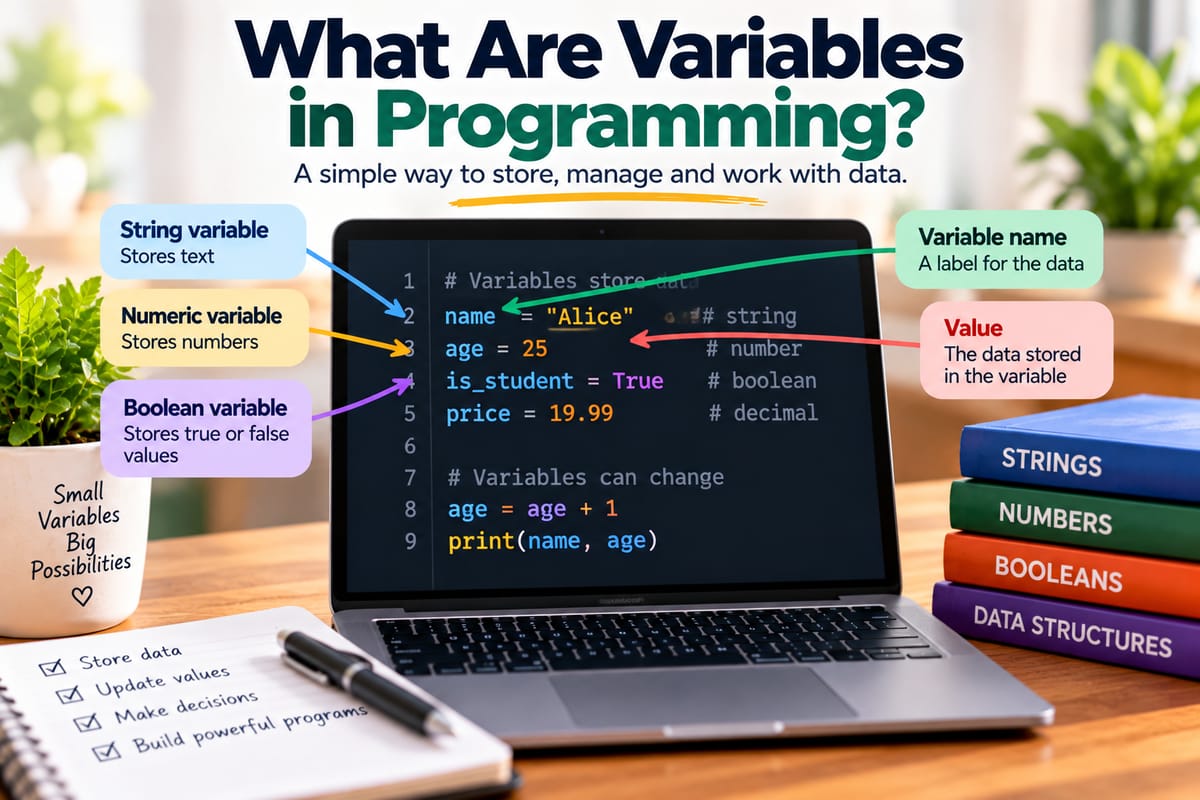
age = 25
Here, age is the variable name and 25 is the value assigned to it.
The program can later use:
age = age + 1
The value becomes 26.
This demonstrates one of the most important characteristics of variables: their values can often change while a program runs.
The exact syntax varies between programming languages, but the underlying concept is widely used.
Variable Names
A variable needs a name so that the program can refer to it.
Good variable names make code easier to understand.
For example:
customerName
totalPrice
numberOfItems
accountBalance
These names communicate what the stored values represent.
Compare that with:
x
a
temp1
data2
Short names are sometimes appropriate in specific situations, but unclear names can make larger programs much harder to maintain.
A programmer reading totalPrice can immediately understand what the variable probably represents. A variable called x provides much less information.
Rules for Naming Variables
Programming languages usually have rules governing valid variable names.
Depending on the language, names may:
- Begin with a letter or permitted symbol
- Contain letters and numbers
- Allow underscores
- Distinguish uppercase and lowercase letters
- Prohibit spaces
- Reserve certain words for the language itself
For example, a language might allow:
customer_name
customerName
itemCount
but reject:
customer name
because the space is not permitted in a variable identifier.
Programming languages can also have different naming conventions. Some commonly use camelCase, while others favor snake_case.
Variables and Values Are Not the Same Thing
It is useful to distinguish a variable from the value associated with it.
Consider:
score = 100
Here:
scoreis the variable.100is the value.
The variable is the named reference used by the program. The value is the information currently associated with it.
If the program later executes:
score = 150
the variable remains score, but its value changes from 100 to 150.
This distinction becomes increasingly important as programs become more complex.
Variables Can Store Different Types of Data
Variables can represent many different kinds of information.
Common data types include:
- Integers
- Floating-point numbers
- Strings
- Booleans
- Characters
- Arrays
- Objects
- Collections
- References
For example:
age = 30
could represent an integer.
name = "Amina"
could represent a string.
isLoggedIn = true
could represent a Boolean value.
The exact set of types depends on the programming language.
Numeric Variables
Numbers are frequently stored in variables.
A program might use numeric variables for:
- Prices
- Quantities
- Scores
- Temperatures
- Distances
- Percentages
- Measurements
- Account balances
For example:
price = 19.99
quantity = 3
The program could then calculate:
total = price * quantity
The resulting value can be stored in another variable.
This makes it possible to build calculations from smaller pieces of information.
String Variables
Strings represent text.
For example:
firstName = "David"
The variable firstName contains a text value.
Programs use string variables for things such as:
- Names
- Addresses
- Messages
- Product descriptions
- Search queries
- File names
- User input
Strings can also be combined.
For example:
firstName = "David"
message = "Hello " + firstName
The resulting message could be:
Hello David
The exact syntax for combining strings differs among programming languages.
Boolean Variables
Boolean variables represent one of two logical states, commonly written as:
true
false
They are especially useful when programs need to make decisions.
For example:
isLoggedIn = true
A program could then check the variable:
if isLoggedIn
showAccount()
Boolean variables are common in applications because software frequently needs to determine whether something is enabled, available, complete, valid, active, or true.
Variables and Data Types
A variable's data type describes what kind of value it is designed to hold or represent.
For example:
age = 25
might be an integer.
price = 14.50
might be a floating-point number.
name = "Maria"
might be a string.
Different programming languages handle types differently. Some require programmers to specify types explicitly, while others infer them from the assigned value.
Understanding these differences is an important part of learning programming languages. What Are Programming Languages and How Do Different Languages Work? explores how programming languages provide different rules and mechanisms for expressing instructions and working with data.
Statically Typed and Dynamically Typed Languages
One important difference between programming languages involves how they handle variable types.
Statically Typed Languages
In a statically typed language, variable types are generally established and checked more strictly.
A programmer might write something conceptually similar to:
integer age = 25
The language knows that age is intended to represent an integer.
Trying to assign an incompatible value may result in an error, depending on the language and situation.
Dynamically Typed Languages
Dynamically typed languages generally determine a variable's type during program execution.
A programmer might simply write:
age = 25
The language determines that the value is numeric.
The exact rules differ significantly between languages, so "statically typed" and "dynamically typed" describe broad approaches rather than identical behaviors.
Declaring and Assigning Variables
Two related concepts are declaration and assignment.
A declaration introduces a variable to the program.
An assignment gives the variable a value.
In some languages, these happen together:
name = "Sam"
In others, they can be separate:
declare name
name = "Sam"
The syntax and rules depend on the language.
Some languages also require programmers to specify the variable's type during declaration.
Initializing a Variable
Initialization means giving a variable its initial value.
For example:
count = 0
The variable count has been initialized to zero.
Initialization can be important because programs should know what state their variables are in before using them.
A variable that has never been assigned an appropriate value can cause errors or unexpected behavior, depending on the language.
Updating Variables
Programs frequently update variables.
For example:
count = 0
count = count + 1
After the second instruction, count becomes 1.
Another update could produce:
count = count + 1
Now it becomes 2.
This pattern appears throughout software.
A shopping cart can update the number of items. A game can update a score. A website can update a user's status. A financial application can update an account balance.
Variables allow programs to represent changing states.
Constants and Variables
Not every named value needs to change.
Some programming languages provide constants or similar mechanisms for values that should remain unchanged after initialization.
For example:
TAX_RATE = 0.16
A constant can communicate that the value is intended to remain fixed.
The exact behavior of constants varies between programming languages.
The distinction is useful because it communicates intent. If a value should not change, treating it as a constant can make the code easier to understand and potentially safer to modify.
Variable Scope
One of the more important concepts surrounding variables is scope.
Scope describes where a variable can be accessed within a program.
A variable might exist only inside a particular function, block, or module. Another variable might be available throughout a larger portion of the application.
For example, a variable created inside a function may only be accessible while that function is executing.
This helps prevent unrelated parts of a program from accidentally changing the same information.
Local Variables
A local variable is generally available only within a particular part of a program.
For example:
function calculateTotal()
price = 20
quantity = 3
Here, price and quantity may be local to the function.
Other parts of the program may not be able to access them directly.
Local variables can make programs easier to organize because information that is needed only for a specific task does not have to be exposed more widely.
Global Variables
A global variable is generally accessible from a much larger part of a program.
For example:
applicationName = "ShopApp"
A program might make that information available to many components.
Global variables can sometimes be useful, but excessive use can make software harder to understand because many parts of the application may be able to change the same value.
This can make unexpected interactions more difficult to track.
For this reason, programmers often prefer carefully controlled data access and smaller scopes when appropriate.
Variables Inside Functions
Functions frequently use variables to perform specific tasks.
For example, a function might receive two numbers and store their sum:
function addNumbers(a, b)
result = a + b
return result
Here, a, b, and result are variables associated with the function.
Functions provide a useful way to organize program logic. How Functions Organize Program Logic explains how programmers use functions to break larger programs into smaller, more manageable pieces.
Variables and functions therefore work closely together.
A function can receive values, store intermediate results, modify information, and return a result.
Parameters Are Related to Variables
Function parameters are names used to represent values supplied to a function.
Consider:
function greet(name)
message = "Hello " + name
return message
Here, name acts as a parameter.
When the function is called:
greet("Amina")
the value "Amina" is supplied to the function.
The function can then use the parameter as part of its logic.
Parameters make functions reusable because the same function can operate on different values.
Variables and Data Structures
A variable can store a single value, but programs often need to manage collections of information.
For example, an online store might need to represent dozens or thousands of products.
Instead of creating a separate variable for every product, programmers can use data structures such as arrays, lists, sets, maps, and other collection types.
For example:
products = ["Laptop", "Phone", "Tablet"]
Here, products represents a collection of values.
Data structures provide organized ways to store and access larger amounts of information. The Complete Guide to Data Structures provides a broader look at how these structures help programs organize and manipulate data.
Variables Can Refer to Complex Objects
Variables do not always contain simple values such as numbers or strings.
In object-oriented and other programming approaches, a variable can refer to a complex object containing multiple pieces of related information.
For example, a customer object might contain:
customer.name
customer.email
customer.address
customer.accountStatus
The variable customer can therefore represent a larger collection of related data and behavior.
This allows programmers to model real-world concepts within software.
Variables and Memory
At a lower level, variables are connected to how computers store information in memory.
When a program runs, it needs somewhere to keep values that it is actively using.
The programming language and runtime environment determine how variables are represented and managed.
A simple variable might correspond to a value stored in a particular memory location. More complex variables can involve references to objects or other structures stored elsewhere in memory.
Programmers do not always need to manage these details directly. Languages with automatic memory management can handle much of this work for them.
However, understanding that variables ultimately relate to stored computer information helps explain why memory management matters.
Variable Lifetime
Variables also have a lifetime.
A variable may exist only while a function is running, or it may remain available for much longer.
For example, a local variable may be created when a function starts and become unnecessary when the function finishes.
Other variables may remain available throughout the lifetime of an application.
Understanding variable lifetime can help programmers reason about memory use and program behavior.
Mutable and Immutable Values
Another useful distinction involves whether information can be changed.
A mutable value can generally be modified after it has been created.
An immutable value cannot be changed directly. Instead, a new value may need to be created.
Different programming languages use different approaches to mutability.
This distinction can affect how programs handle variables, objects, memory, and concurrency.
Immutable data can sometimes make complex software easier to reason about because programmers know that an existing value will not unexpectedly change.
Variable Naming and Readable Code
Good variable names are part of writing maintainable software.
Consider:
x = 25
y = 10
z = x * y
The code may work, but someone reading it has little context.
Now consider:
price = 25
quantity = 10
totalCost = price * quantity
The purpose is much clearer.
Readable variable names can reduce the amount of explanation required elsewhere in the code.
They also make debugging and maintenance easier for developers who encounter the program later.
Common Mistakes With Variables
Beginners often encounter a few recurring problems when learning variables.
Using a Variable Before Assigning a Value
A program may try to use a variable that has not been properly initialized.
Depending on the language, this can produce an error or an unexpected value.
Using the Wrong Data Type
A program may attempt an operation that is incompatible with the variable's value.
For example, treating text as though it were a number can cause problems.
Accidentally Overwriting a Value
A variable may be assigned a new value unintentionally.
This can be particularly difficult to identify in large programs.
Using Unclear Names
Names such as x1, temp2, and thing may make code difficult to understand when they are used without meaningful context.
Creating Excessive Shared State
Allowing too many parts of a program to modify the same variables can make behavior difficult to predict.
Confusing Assignment With Comparison
Many programming languages use different operators for assigning a value and checking whether two values are equal.
For example, a language may use:
x = 10
for assignment and:
x == 10
for comparison.
The exact syntax depends on the language.
Variables Make Programs Dynamic
One of the most important reasons variables matter is that they allow software to respond to changing circumstances.
Imagine a program without variables.
It would have difficulty remembering:
- Who is logged in
- What products are in a shopping cart
- How many points a player has
- What a customer searched for
- Which settings a user selected
- What information was entered into a form
Variables give programs a way to maintain state.
That state can change as users interact with the application or as the program processes new information.
Variables in Everyday Software
Variables are present in almost every type of software.
Websites
A website can use variables to store user information, page settings, search terms, and application state.
Mobile Apps
Apps use variables to track user preferences, navigation state, messages, account information, and other data.
Games
Games use variables for health, score, inventory, player position, time, levels, and game states.
Business Software
Business applications can use variables for prices, quantities, customer records, invoices, transactions, and reports.
Scientific Software
Scientific programs use variables to represent measurements, calculations, experimental data, and simulation parameters.
Embedded Systems
Devices can use variables to store sensor readings, device states, timing information, and control values.
The details differ between applications, but the fundamental idea remains the same: software needs ways to represent information that can be accessed and, when appropriate, changed.
Why Variables Matter for New Programmers
Variables may initially seem like a small concept, but they appear everywhere in programming.
Once a beginner understands variables, many other concepts become easier to approach.
Variables connect naturally with:
- Data types
- Operators
- Functions
- Conditions
- Loops
- Arrays
- Objects
- Data structures
- Algorithms
- Program state
For example, a loop may repeatedly update a counter variable. A conditional statement may examine a Boolean variable. A function may receive variables as parameters and produce another variable as a result.
Learning variables therefore creates a foundation for understanding how these concepts interact.
Building Programs One Variable at a Time
Variables provide programs with a practical way to remember, manipulate, and organize information.
They can represent simple values such as numbers and text, or they can refer to complex objects and collections. Their behavior depends on the programming language, including its rules for types, scope, memory, mutability, and assignment.
The concept itself remains straightforward: a variable gives a program a named way to work with information.
Once programmers understand how variables are created, updated, accessed, and organized, they can begin combining them with functions, conditions, loops, and data structures to build increasingly sophisticated software.
That simple ability to give information a name and work with its changing value is one of the foundations on which modern programs are built.