How App Permissions Affect Security
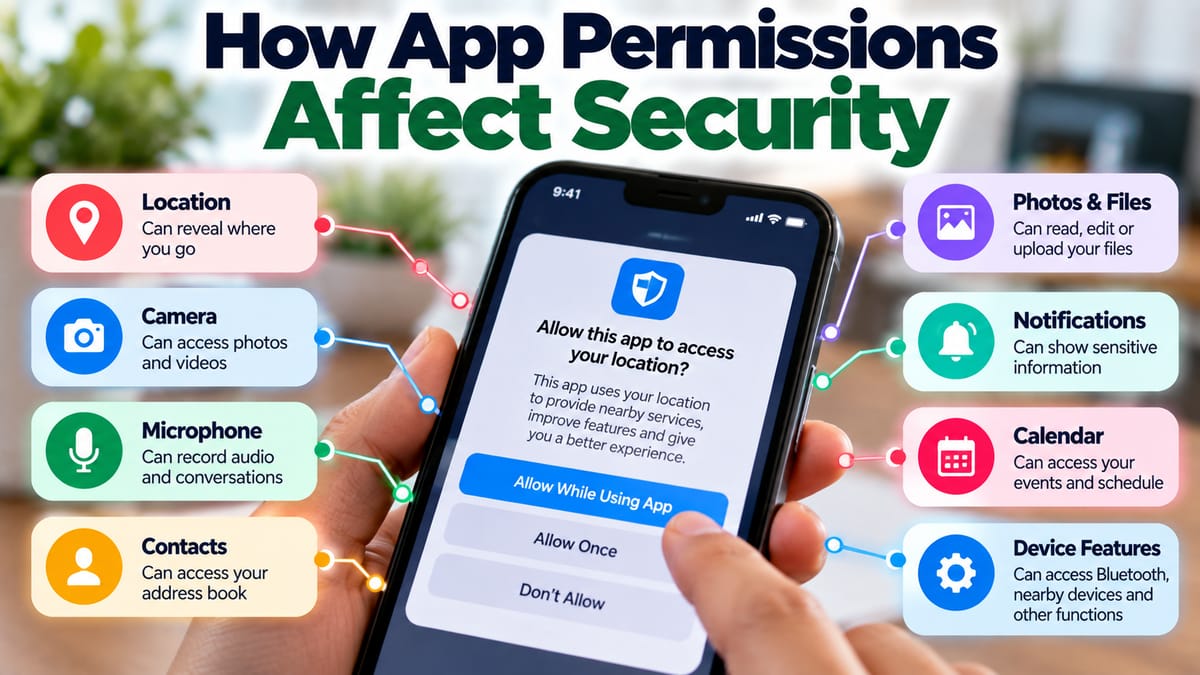
Modern apps can perform an enormous range of tasks. They can access cameras, microphones, contacts, photos, location data, files, notifications, and other device features. These capabilities make apps useful, but they also create potential security and privacy risks when access is excessive, unnecessary, or poorly managed.
App permissions are designed to give users some control over what applications can access. Understanding those permissions can help people make better decisions about which apps to install, what access to grant, and when permissions should be removed.
Security is not simply about whether an app is legitimate. It also involves limiting access to information and device functions to what is reasonably necessary for the app to perform its intended purpose.
What Are App Permissions?
App permissions are controls that determine whether an application can access particular information, hardware, or capabilities on a device.
Depending on the operating system and application, permissions may cover resources such as:
- Camera
- Microphone
- Location
- Contacts
- Photos and videos
- Files and storage
- Calendar
- Notifications
- Bluetooth
- Nearby devices
- Phone functions
- Messages
- Sensors
- Accessibility features
The exact permissions available differ between operating systems.
The Complete Guide to Apps provides broader context on how applications work and the different roles they can play on modern devices.
Why Apps Need Permissions
Many applications require access to device resources to provide their core functionality.
A navigation app may need location information to provide directions. A video-calling app may need access to the camera and microphone. A photo-editing application may need permission to access images selected by the user.
Permissions can therefore be necessary for legitimate reasons.
The security question is not simply whether an app requests access. It is whether the requested access makes sense for the app's purpose and whether that access is appropriately controlled.
How Excessive Permissions Can Increase Risk
Every permission granted to an application can potentially expand what that application is able to access.
If an app receives access to sensitive information that it does not genuinely need, unnecessary exposure can result.
For example, a simple flashlight application generally has little reason to access a user's contacts or personal photographs.
Excessive permissions can create risks such as:
- Unnecessary exposure of personal information
- Greater consequences if an app is compromised
- Unwanted data collection
- Unauthorized access to device features
- Increased privacy concerns
- Greater opportunities for malicious behavior
Granting fewer unnecessary permissions reduces the amount of access available to an application.
Camera Permissions
Camera access allows an application to use the device's camera under the conditions permitted by the operating system.
Camera access may be necessary for:
- Video calls
- Photography
- Document scanning
- Augmented reality
- QR code scanning
- Visual search
However, camera access can also involve sensitive personal environments because cameras can capture people, documents, locations, and other private information.
Users should consider whether an application genuinely needs camera access and whether the operating system provides indicators showing when the camera is active.
Microphone Permissions
Microphone access can expose conversations and sounds within the surrounding environment.
Apps may legitimately need microphone access for:
- Voice calls
- Video conferencing
- Voice recording
- Voice commands
- Audio creation
- Speech recognition
A simple application that has no obvious audio-related functionality requesting microphone access deserves closer examination.
Users should also review microphone permissions periodically because an application that once needed access may no longer require it.
Location Permissions
Location data can reveal where a person is, where they travel, and potentially patterns in their daily activities.
Location access can be useful for:
- Navigation
- Mapping
- Weather
- Ride services
- Local search
- Fitness tracking
- Location-based reminders
However, location information can be highly sensitive.
Where supported, users may have choices such as allowing access only while an app is being used, allowing approximate rather than precise location, or denying access entirely.
Choosing the least access that still allows the application to function can reduce unnecessary exposure.
Contacts Permissions
Contacts contain information about other people as well as the device owner.
An application may legitimately need contacts for certain communication or social functions, but not every app needs access to an entire address book.
Before granting contacts access, consider whether the feature requiring it is genuinely necessary.
If an application can perform its main function without access to contacts, denying the permission may be appropriate.
Photos, Videos, and Files
Modern mobile operating systems increasingly provide more granular controls over access to photographs and files.
Instead of giving an application access to an entire library, users may sometimes be able to provide access only to selected content.
This distinction matters because personal photo libraries can contain:
- Family photographs
- Identity documents
- Screenshots
- Financial information
- Travel records
- Private conversations
- Work materials
Limiting access to the specific files an app needs can reduce unnecessary exposure.
Notifications Can Also Matter for Security
Notifications may appear less sensitive than camera or location permissions, but they can still expose information.
Messages, authentication codes, financial alerts, appointment details, and private communications can appear in notifications.
An application with permission to display notifications may therefore reveal information on a locked or shared screen depending on the device's settings.
Users should consider which apps are allowed to display notifications and how sensitive information is presented when the device is locked.
Accessibility Permissions Require Particular Care
Some operating systems provide accessibility features that allow applications to interact with other applications or assist users with disabilities.
These capabilities can be extremely useful for legitimate accessibility tools.
However, broad accessibility access can also be powerful because it may allow an application to observe or interact with information beyond its own interface.
Users should therefore be particularly careful when unfamiliar applications request advanced accessibility access.
Only grant powerful device capabilities when there is a clear and trusted reason to do so.
Permissions and Identity Security
App permissions are closely connected to identity and access security.
Identity security focuses on determining who a user is and controlling what that user or an application is allowed to access.
The Complete Guide to Identity and Access Security explains the broader principles behind authentication, authorization, access control, and protection of digital identities.
App permissions represent one part of this larger security model.
Instead of assuming that an application should have unrestricted access once it has been installed, modern security approaches increasingly emphasize limiting access according to actual requirements.
Authentication Does Not Replace Permission Controls
Logging into an application securely is important, but authentication and permissions address different problems.
Authentication asks:
Who are you?
Authorization asks:
What are you allowed to access?
An application can have strong login security while still requesting unnecessary access to information on a device.
For this reason, secure authentication should be combined with appropriate permissions and access controls.
App Permissions and Data Privacy
Security and privacy are closely related, but they are not identical.
Security focuses heavily on protecting information and systems from unauthorized access, alteration, or disruption.
Privacy concerns how personal information is collected, used, shared, stored, and managed.
The What Is Data Privacy and Why It Matters guide provides a broader explanation of these principles.
An app may technically have permission to access information while still raising important questions about what it does with that information.
What Happens to Data After Permission Is Granted?
Giving an app permission to access information does not necessarily mean that the information stays on the device.
Depending on the application, data may be:
- Processed locally
- Stored on the device
- Uploaded to cloud servers
- Shared with service providers
- Used to personalize features
- Combined with other information
- Retained for a particular period
This is why permissions should be considered alongside an application's privacy practices.
Understanding how personal data is collected and used can help users look beyond the permission prompt itself and consider what may happen after information is accessed.
Why Permission Prompts Should Not Be Ignored
Permission prompts can become easy to dismiss.
When an application asks for access immediately after installation, users may simply press "Allow" to reach the application's main screen.
This behavior can create unnecessary exposure.
Instead, take a moment to ask:
- What information is being requested?
- Why does the app need it?
- Is the request related to a feature I intend to use?
- Can I deny it without losing important functionality?
- Is there a less intrusive permission option?
A few seconds of consideration can prevent unnecessary access.
The Principle of Least Privilege
A useful security principle is least privilege.
It means giving an application, user, or system component only the access it needs to perform its legitimate function.
For apps, this might mean:
- Allowing location only while using the app
- Giving access to selected photographs instead of the entire library
- Denying microphone access to apps that do not need it
- Restricting contacts access
- Disabling unnecessary notifications
- Removing permissions that are no longer required
Least privilege limits the potential consequences if an account, application, or device is compromised.
Why Permission Management Matters Even for Trusted Apps
A trusted application can still collect information that a user does not want to share.
Trust and access are therefore separate considerations.
An app may be legitimate but still request permissions that are unnecessary for a particular user.
For example, someone may want to use a photo application only for editing selected pictures. If the operating system allows selective access, there may be little reason to provide unrestricted access to an entire photo library.
Permission management gives users greater control over how legitimate software interacts with their devices.
Review Permissions After Installing an App
Permission decisions should not be considered permanent.
An application may change over time, add new features, or no longer need access that was previously granted.
Users should periodically review installed apps and the permissions they have received.
Look for:
- Apps with access to sensitive information
- Permissions that no longer appear necessary
- Applications that are rarely used
- Apps whose purpose has changed
- Unexpected permissions
- Apps that have been installed for a long time without review
Removing unnecessary permissions can reduce exposure without requiring the application to be uninstalled.
Delete Apps You No Longer Use
Unused applications can remain installed for months or years.
If an app is no longer needed, uninstalling it can be a simple way to eliminate its access to device resources.
This is especially useful for applications that:
- No longer receive updates
- Are no longer supported
- Have not been used for a long period
- Were installed for a temporary purpose
- Request extensive permissions
Keeping fewer unnecessary applications can also make device management easier.
Keep Apps Updated
Software vulnerabilities can sometimes be discovered after an application has already been released.
Developers may issue updates that address security weaknesses, fix bugs, and improve compatibility.
Keeping applications updated can therefore reduce exposure to known vulnerabilities.
However, users should obtain updates through trusted app stores or official software mechanisms rather than responding to suspicious update messages.
Permissions Can Change as Apps Evolve
An application may start as a relatively simple tool and later add new features.
A messaging app might introduce video calling. A shopping app might add location-based services. A productivity app might add document scanning.
New functionality can sometimes create legitimate reasons for new permissions.
When an app requests additional access after an update, users should still consider whether the new permission makes sense.
An update does not automatically make every new permission necessary.
Be Careful With Apps From Unknown Sources
The source of an application can affect the level of risk involved.
Official app marketplaces and recognized software publishers generally provide more information and security controls than unknown download sites.
Users should be particularly cautious with applications distributed through:
- Unfamiliar websites
- Unexpected links
- Unverified file-sharing services
- Modified or pirated software packages
- Suspicious advertisements
- Unsolicited messages
Installing software from an unknown source can create risks that permissions alone cannot eliminate.
Fake Apps Can Abuse Familiar Permissions
Malicious or deceptive applications may imitate legitimate software.
A fake application can request permissions that appear reasonable because they resemble the permissions used by the genuine application.
For example, a fake messaging app might request contacts and microphone access. Those permissions may seem normal for a messaging service, even though the application itself is not legitimate.
This is why users should evaluate both the application and its permissions.
Permission Abuse and Compromised Apps
Permissions can become particularly important if an application is compromised.
Suppose an otherwise legitimate application has access to contacts, files, location, and other sensitive resources. If an attacker gains control over the application or exploits a serious vulnerability, the application's existing privileges could potentially increase the impact of the compromise.
Limiting unnecessary permissions can therefore reduce the potential damage.
This is one reason security professionals emphasize defense in depth rather than relying on a single protective measure.
Business Apps Require Additional Attention
Permissions are especially important in workplaces because business applications may have access to sensitive organizational information.
An employee's device might contain:
- Customer information
- Business documents
- Financial data
- Authentication credentials
- Internal communications
- Corporate applications
Organizations can use mobile-device management, application controls, identity systems, access policies, and other security measures to limit unnecessary access.
Employees should also avoid granting powerful permissions to unapproved applications on devices used for sensitive work.
App Permissions on Shared Devices
Shared devices create additional considerations.
If several people use the same device, an application with access to contacts, photographs, messages, or files may expose information belonging to multiple users.
Separate user profiles, account controls, and appropriate permission settings can help reduce this risk where supported.
Users should also avoid granting broad permissions simply because an app is convenient.
What to Do When an App Requests an Unexpected Permission
If an application suddenly asks for access that seems unrelated to its purpose, pause before accepting.
Consider these steps:
- Read the permission request carefully.
- Identify the feature that supposedly requires the permission.
- Check whether the permission can be denied.
- Review the app's settings.
- Check whether a less extensive access option is available.
- Review the developer and application information.
- Consider uninstalling the app if the request cannot be reasonably explained.
There is no need to grant access simply because an application asks for it.
A Practical App Permission Checklist
Before granting a sensitive permission, ask:
Does the app actually need it?
Consider whether the permission directly supports a feature you use.
Can I limit the permission?
Look for options such as temporary, approximate, selected, or while-in-use access when available.
Is the developer trustworthy?
Check whether the application comes from a recognizable source.
What information could be exposed?
Consider whether the permission involves sensitive personal, financial, professional, or location information.
Can I revoke it later?
Many modern operating systems allow users to change permissions after installation.
Do I still need this app?
If you rarely use it, removing it may be more appropriate than keeping unnecessary access active.
What Permissions Cannot Tell You
Permission settings are useful, but they do not provide a complete picture of an application's behavior.
A permission may tell you that an app can access a particular resource, but it may not fully explain:
- How long the data is retained
- Whether it is uploaded
- Who receives it
- How it is analyzed
- Whether it is combined with other information
- How it is protected
- Whether it is deleted later
That information may be addressed in the application's privacy documentation.
Security and privacy therefore require looking beyond the permission prompt.
The Difference Between Necessary and Convenient Access
Some permissions may be genuinely necessary for an application's core function.
Others may simply make additional features more convenient.
For example, an application may work without location access but offer personalized local recommendations when location is enabled.
In such situations, the user can decide whether the convenience is worth providing the additional information.
There is an important distinction between:
"The app cannot perform its primary function without this permission."
and:
"The app offers an additional feature if I grant this permission."
Understanding that difference gives users more control.
Better Permission Habits Improve Digital Security
App permissions are only one part of a larger security system, but they are an important layer because they determine what applications can access.
A safer approach is to treat permission requests as decisions rather than routine pop-ups.
Use the principle of least privilege, review permissions periodically, remove access that is no longer necessary, keep applications updated, and pay attention when an app requests capabilities that do not seem connected to its purpose.
The objective is not to deny every permission. Apps need access to certain resources to provide useful features. The goal is to make access intentional, appropriate, and limited.
When users understand why permissions exist and what they allow, they can make more informed choices about which applications they trust and how much access those applications receive.