**How Developers Collaborate With Version Control
Modern software development is rarely a one-person activity. Even relatively small projects can involve multiple developers working on the same codebase, reviewing changes, fixing bugs, updating documentation, and preparing new features.
Without a reliable way to coordinate those changes, collaboration can quickly become complicated. Developers may accidentally overwrite each other's work, struggle to identify when a bug was introduced, or spend significant time trying to determine which version of a file is current.
Version control provides the foundation for managing this complexity. It records changes to files over time and gives developers tools for creating separate lines of work, reviewing modifications, resolving conflicts, and combining contributions.
Git is one of the most widely used version control systems, and platforms built around Git make it possible for distributed development teams to collaborate on projects without requiring everyone to work on the same files simultaneously.
What Is Version Control?
Version control is a system for tracking changes to files, particularly source code, as a project develops.
Instead of simply saving a file repeatedly with names such as project-final, project-final-2, and project-final-new, version control maintains a structured history of modifications.
Developers can use that history to determine:
- Who changed a file
- What was changed
- When the change occurred
- Why the change was made, when documented
- Which version existed previously
- How different versions compare
- Whether an earlier version needs to be restored
For developers who want a broader introduction, the Git and Version Control Guide for Developers provides additional context on the concepts and workflows behind version control.
Why Developers Need Version Control for Collaboration
The main challenge in collaborative coding is that multiple people need to modify a shared collection of files without disrupting one another.
Imagine three developers working on the same application. One is adding authentication, another is improving the user interface, and a third is fixing a database issue.
If everyone edits a shared folder independently and exchanges files manually, keeping track of those changes becomes difficult.
Version control gives each developer a structured way to work while preserving the project's history.
It allows developers to make changes independently and then integrate those changes into the appropriate part of the project.
This separation is particularly useful when developers are working on different features at the same time.
Repositories Provide a Shared Source of Truth
A repository is the central structure in which a project's version-controlled files and their history are stored.
Depending on the workflow, a repository may exist locally on a developer's computer, on a remote server, or in both locations.
A typical collaborative workflow involves developers maintaining a local copy of a repository while communicating changes through a shared remote repository.
The remote repository acts as an important reference point for the team. Developers can retrieve changes made by colleagues and publish their own completed work for others to review or use.
This approach reduces the need to exchange source-code files manually.
Commits Create a Record of Work
A commit represents a recorded set of changes in a version-controlled project.
Developers generally make commits after completing a logical piece of work. A commit might contain a bug fix, a new function, a configuration change, or part of a larger feature.
Good commits are usually focused and understandable.
For example, rather than combining unrelated changes into one large commit, a developer might separately commit:
- A database migration
- A bug fix
- A user-interface adjustment
- Automated tests for a new feature
This creates a clearer project history and makes it easier for other developers to understand what happened.
Commit messages also matter. A concise message describing the purpose of a change can save time when someone later examines the project's history.
Branches Let Developers Work Independently
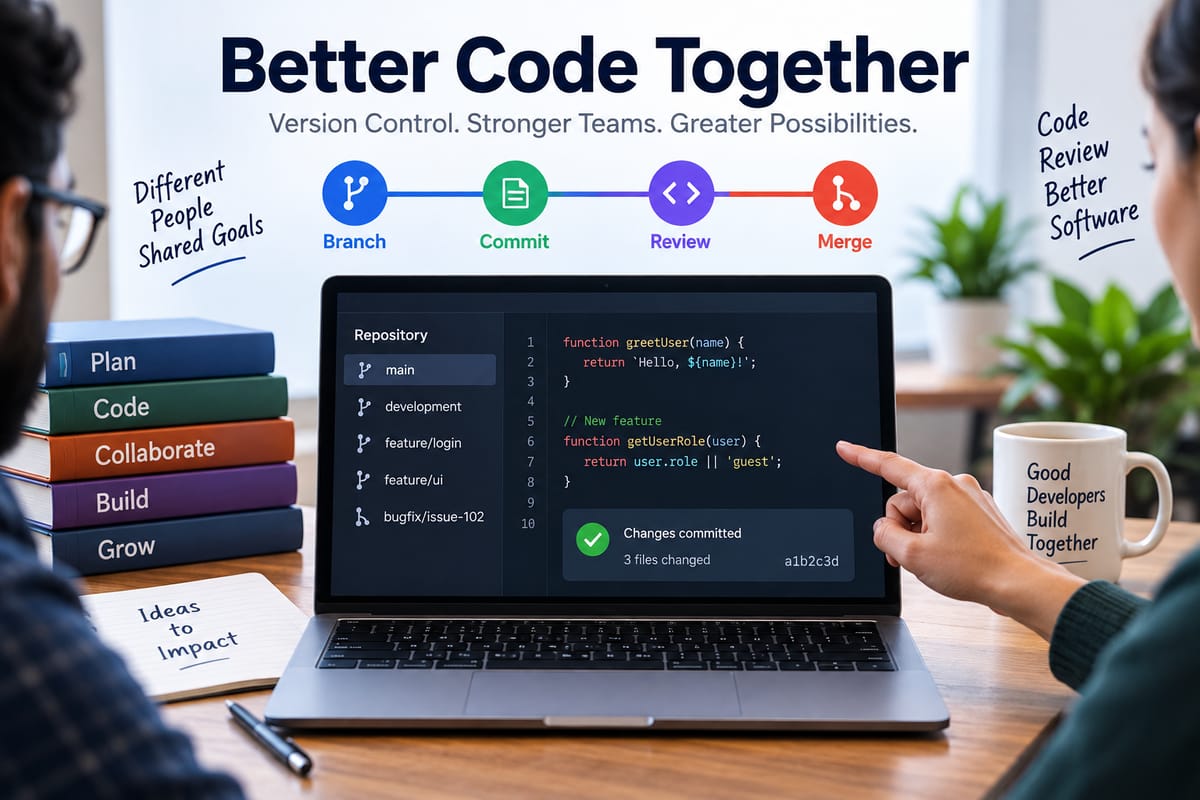
Branches are one of the most important collaboration features in Git-based development.
A branch provides a separate line of development within a repository. Developers can use branches to work on features or fixes without immediately changing the main development line.
For example, a team might have:
- A
mainbranch for stable code - A
developmentbranch for ongoing integration - A feature branch for a new payment system
- A bug-fix branch for a specific production problem
The exact branching strategy depends on the project's requirements and team practices.
The important principle is that developers can isolate work until it is ready to be reviewed or integrated.
Pull Requests Support Code Review
When a developer finishes a piece of work, the changes can be proposed for integration through a pull request or a similar review mechanism.
A pull request allows other developers to examine the proposed changes before they become part of the target branch.
Reviewers can examine:
- Code modifications
- Commit history
- Automated test results
- Potential bugs
- Design decisions
- Naming and readability
- Compatibility with existing functionality
They can also leave comments and request changes.
This makes code review a collaborative activity rather than simply an approval step.
Code Review Improves Shared Understanding
Code review has benefits beyond finding bugs.
When developers review one another's work, they become more familiar with different parts of the codebase. This reduces the risk that knowledge about an important component exists only with one person.
Reviews can also establish shared standards for architecture, naming, testing and maintainability.
Teams that consistently review code can develop common expectations about what acceptable changes look like.
However, effective reviews should focus on meaningful technical issues rather than unnecessary stylistic disagreements.
How Merge Conflicts Happen
Version control does not eliminate conflicts. Instead, it provides mechanisms for identifying and resolving them.
A merge conflict can occur when two developers make incompatible changes to the same part of a file.
For example, one developer might change a function to accept a new parameter while another developer modifies the same lines to support a different behavior.
Git may be unable to determine automatically which version should remain.
When this happens, the developer integrating the changes must examine the conflicting code and decide how the changes should be combined.
Resolving Conflicts Requires Communication
A merge conflict is technically a code-management problem, but resolving it can also require communication.
Developers need to understand why both changes were made before deciding how to combine them.
A useful conflict-resolution process generally involves:
- Identifying the conflicting files.
- Examining both sets of changes.
- Understanding the purpose of each change.
- Combining the changes appropriately.
- Running relevant tests.
- Reviewing the resulting code.
- Completing the merge.
The correct resolution is not always to choose one developer's version. Sometimes both changes need to be incorporated.
Pulling and Pushing Changes
Developers commonly use operations that move changes between their local repository and a shared remote repository.
A developer can retrieve changes from the remote repository so their local work reflects recent updates from teammates.
After making and committing local changes, the developer can publish those commits to the remote repository.
This creates an ongoing exchange:
Remote repository → Local repository → Local changes → Commit → Remote repository
The precise commands and workflow vary depending on the tools and team conventions, but the underlying principle remains the same: developers synchronize their work through a shared version history.
Version Control Fits Into the Software Development Process
Version control is not an isolated development practice. It works alongside planning, design, implementation, testing, deployment and maintenance.
A team may begin by defining requirements, break those requirements into tasks, assign work to developers, implement changes in branches, review those changes, run automated tests and then deploy approved code.
This broader relationship is explored in the Complete Guide to Software Development Processes.
Version control provides the infrastructure for managing many of the code changes produced during those stages.
Connecting Development With Operations
In modern software teams, code frequently moves through automated testing, staging and production environments.
This makes version control especially important for DevOps practices. A repository can serve as the source from which automated systems retrieve code, run tests, build applications and prepare deployments.
Version-controlled configuration files and infrastructure definitions can also make changes to operational environments more traceable.
The relationship between these practices is explained further in How DevOps Connects Software Development With IT Operations.
Automated Testing and Version Control
Automated tests can be connected to version-control workflows so that changes are tested before they are merged.
For example, when a developer submits a pull request, an automated system might:
- Install project dependencies
- Compile the application
- Run unit tests
- Run integration tests
- Check code formatting
- Perform static analysis
- Generate a test report
If a change causes a test to fail, the team can investigate before integrating the code.
This helps reduce the likelihood that an apparently small change will introduce an unexpected problem elsewhere.
Keeping Code Maintainable
Collaboration becomes easier when the underlying codebase is understandable.
Poorly structured code can make it difficult for developers to determine how a change affects other components. Clear organization, meaningful names, appropriate documentation and useful tests can reduce that difficulty.
The principles described in How to Write Maintainable and High-Quality Software Code are therefore closely connected to collaborative development.
Version control records what changed, while maintainable code makes those changes easier for other developers to understand and safely modify.
Small Changes Are Often Easier to Review
Large changes can be difficult to review because they may touch dozens of files and involve multiple unrelated modifications.
Developers can often make collaboration easier by breaking work into smaller, logical changes.
For example, a new application feature might be divided into separate changes for:
- Database structures
- Backend functionality
- API endpoints
- Frontend components
- Automated tests
- Documentation
The appropriate division depends on the project, but smaller logical units can make review and troubleshooting more manageable.
Protecting Important Branches
Teams often establish rules around important branches to reduce accidental changes.
A protected branch may require pull requests, code reviews or successful automated tests before changes can be integrated.
These controls are particularly useful for branches associated with production-ready software.
They can help prevent a developer from accidentally pushing unfinished work directly into a critical branch.
The exact protections should reflect the project's risk level and development process.
Managing Multiple Developers and Time Zones
Distributed teams can benefit significantly from version control because developers do not need to be online simultaneously to contribute.
One developer can commit work during their working hours, while another can review or build upon it later.
A well-maintained commit history also provides asynchronous context. Developers can inspect previous changes instead of relying entirely on meetings or messages to understand what happened.
This can be especially useful for teams spread across multiple countries and time zones.
Using Version History to Investigate Problems
One of version control's most valuable features is the ability to investigate historical changes.
Suppose an application worked correctly last week but now produces an unexpected error.
Developers can examine recent commits and identify which files changed during the relevant period. They can compare versions and investigate the changes that may be related to the problem.
If necessary, a previous version can also be restored or a problematic change can be reverted.
This provides a safety mechanism that ordinary file-sharing workflows generally cannot provide as effectively.
Collaboration Requires More Than Git Commands
Knowing version-control commands is useful, but successful collaboration depends on team practices as well.
Developers need shared expectations around:
- Branch naming
- Commit messages
- Pull requests
- Code reviews
- Testing
- Merging
- Release procedures
- Conflict resolution
- Documentation
Without agreed practices, even a technically sophisticated version-control system can become difficult to manage.
Teams should therefore document their workflow and make it easy for new developers to understand how contributions move from local development to production.
Common Version-Control Mistakes
Several habits can make collaborative development unnecessarily difficult.
Working for Too Long Without Synchronizing
If a developer works on a branch for a long period without incorporating relevant changes from the rest of the project, integrating the work may become harder.
Making Huge Commits
Large commits containing many unrelated changes can make code review and troubleshooting more difficult.
Using Unclear Commit Messages
Messages such as "changes" or "fix stuff" provide little useful information to someone examining the history later.
Ignoring Tests Before Merging
A change that looks correct may still break another component. Running relevant tests helps identify problems before integration.
Committing Sensitive Information
Passwords, private keys, API credentials and other secrets should not be placed in source-code repositories. Teams should use appropriate secret-management practices instead.
Treating the Main Branch as a Personal Workspace
Directly making experimental or unfinished changes in a shared stable branch can create unnecessary risks.
Building a Reliable Collaborative Workflow
A practical version-control workflow can be relatively straightforward:
Plan → Create branch → Make changes → Test → Commit → Push → Review → Resolve feedback → Merge → Deploy
After deployment, the team can monitor the application and create additional branches for fixes or improvements when necessary.
The process can be automated to different degrees depending on the project's size and requirements.
Small teams may use a simple branch-and-pull-request workflow, while larger engineering organizations may implement sophisticated continuous integration and deployment pipelines.
Version Control as a Record of Collective Work
The value of version control extends beyond preventing files from being overwritten.
It creates a historical record of how a software project evolved. Developers can see how functionality was introduced, how bugs were fixed and how different parts of the system changed over time.
That history can support debugging, code review, onboarding, auditing and long-term maintenance.
Most importantly, version control gives developers a structured way to work independently while remaining connected to a shared codebase. With clear branching practices, focused commits, effective reviews, automated testing and good communication, teams can coordinate complex software projects without losing track of who changed what or why.
As software projects become larger and development teams become increasingly distributed, that combination of technical tooling and collaborative discipline remains central to keeping software development organized, traceable and sustainable.