How Websites Work Behind The Scenes
When you open a website, the experience can feel almost instantaneous. You enter an address, tap a link, or search for something, and within moments a page appears with text, images, buttons, menus, forms, and interactive features.
Behind that seemingly simple experience is a collection of technologies working together.
A website is not just a collection of pages sitting on a computer somewhere. Modern websites rely on browsers, servers, networks, databases, application code, security systems, and many other components. Each has a specific role in delivering information and responding to what visitors do.
Understanding what happens behind the scenes makes it easier to understand how websites are built, maintained, secured, and improved.
What Happens When You Visit a Website?
A website visit begins when a user enters a web address into a browser or clicks a link.
The browser needs to determine where the website is located and request the appropriate resources. Those resources may include HTML documents, CSS files, JavaScript files, images, fonts, videos, and data retrieved from a server.
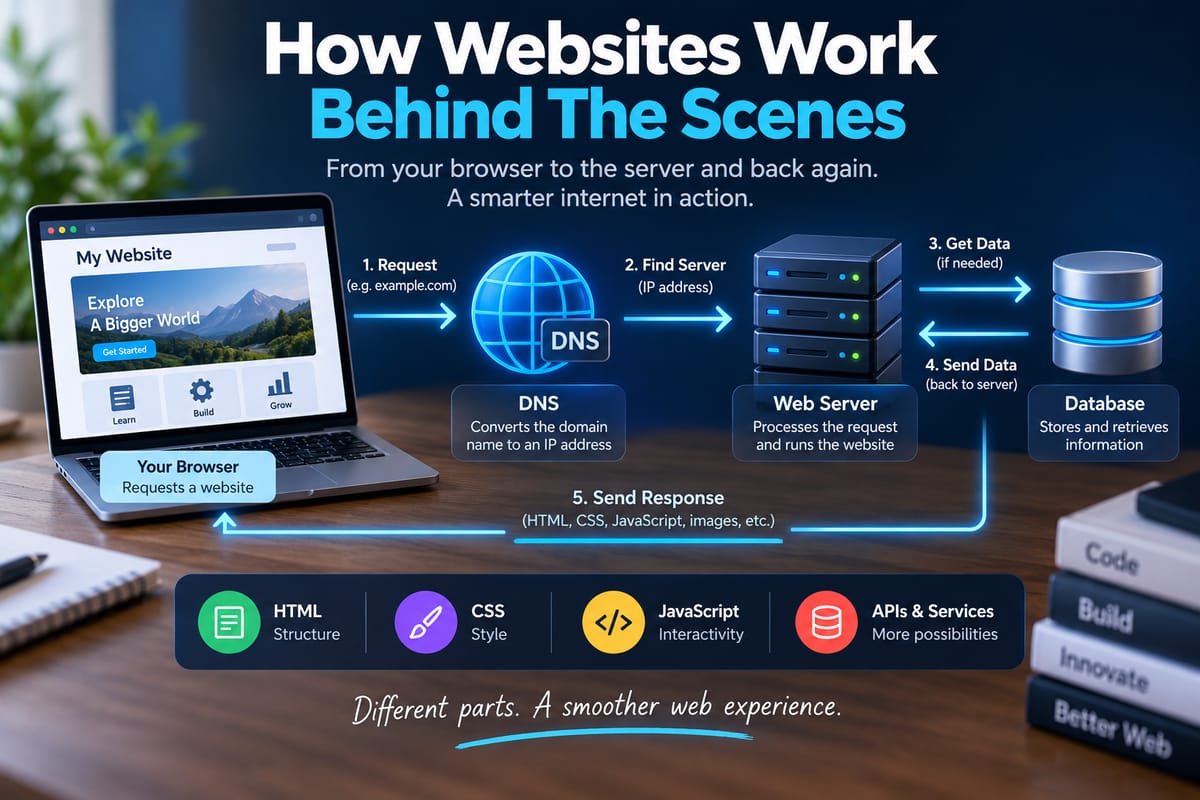
In simplified terms, the process looks like this:
- The user requests a website.
- The browser identifies the website's address.
- A domain name is translated into an IP address.
- The browser establishes a connection with the appropriate server.
- The server processes the request.
- The server sends information back to the browser.
- The browser interprets the files and displays the page.
- Additional requests may occur as the page loads.
- JavaScript and other code can make the page interactive.
This entire process can happen in a fraction of a second, although the actual timing depends on the website, network, server, device, and amount of information being transferred.
Websites Are Built From Multiple Technologies
A typical website combines several technologies rather than relying on one programming language.
Three fundamental technologies are:
- HTML, which provides structure and content.
- CSS, which controls presentation and visual layout.
- JavaScript, which can provide behavior and interactivity.
Behind these technologies are servers, databases, APIs, networking systems, authentication mechanisms, content management systems, and other infrastructure.
This separation allows different parts of a website to perform specialized jobs.
For a broader look at how websites are designed and built, The Complete Guide to Web Development provides a useful overview of the development process and the technologies involved.
The Browser Is More Than a Window
The web browser is responsible for much of what users see and interact with.
Popular browsers can interpret HTML, CSS, and JavaScript and turn those instructions into a visual interface.
When the browser receives an HTML document, it builds a representation of the page structure. It then processes CSS to determine how elements should appear and executes JavaScript when necessary.
The browser may also:
- Load images.
- Download fonts.
- Execute scripts.
- Store cookies.
- Manage local storage.
- Communicate with APIs.
- Handle user input.
- Maintain security restrictions.
- Cache frequently requested resources.
The browser therefore acts as an important bridge between the user and the technology powering the website.
What Is the Front End?
The front end is the part of a website that users interact with directly.
It includes elements such as:
- Navigation menus.
- Buttons.
- Forms.
- Headings.
- Images.
- Cards.
- Search boxes.
- Product displays.
- Animations.
- Interactive dashboards.
Front-end developers use HTML, CSS, JavaScript, frameworks, libraries, and other tools to create these interfaces.
The front end communicates with the systems behind the website whenever it needs information or needs to perform an action.
For a deeper explanation, what frontend development is and how developers build interactive web interfaces explores the user-facing side of web applications in greater detail.
What Is the Back End?
The back end consists of systems that operate behind the user interface.
A backend application might:
- Process requests.
- Authenticate users.
- Apply business rules.
- Retrieve information from databases.
- Store new information.
- Process payments.
- Manage accounts.
- Generate responses.
- Communicate with external services.
For example, imagine logging into an online shopping website.
The page where you enter your username and password is part of the front end. When you submit those details, the backend can receive the request, verify the credentials, retrieve account information, and return an appropriate response.
The user may see only a loading indicator and then a dashboard, but many operations can occur behind the scenes.
Backend development covers the server-side technologies and processes responsible for this type of functionality.
How Web Servers Respond to Requests
A web server is responsible for receiving and responding to requests.
When a browser requests a resource, the server determines what should be returned.
For a simple static website, the server might return a stored HTML file.
For a dynamic application, the process can be considerably more complicated.
The server may need to:
- Receive the request.
- Identify the requested resource.
- Authenticate the user if necessary.
- Run application code.
- Retrieve information from a database.
- Process the information.
- Generate a response.
- Send the response to the browser.
The response may contain HTML, JSON data, images, files, or another type of resource.
Static Websites and Dynamic Websites
Not every website works in exactly the same way.
Static Websites
A static website generally serves files that have already been created.
For example, a server might have:
index.html
about.html
styles.css
script.js
When someone requests the homepage, the server can return the corresponding file.
Static websites can be relatively simple and efficient because they do not necessarily need to generate new content for every request.
Dynamic Websites
Dynamic websites generate or retrieve content based on requests.
A news website, for example, might have thousands of articles stored in a database.
Instead of creating a separate complete HTML file manually for every possible page, the application can retrieve the relevant article and generate the page when requested.
Dynamic systems make it possible to support features such as:
- User accounts.
- Personalized dashboards.
- Shopping carts.
- Search systems.
- Comments.
- Content management.
- Online transactions.
Many modern websites combine static and dynamic approaches.
How Databases Fit Into Websites
A database stores information that an application needs to use.
Depending on the website, a database might contain:
- User accounts.
- Product information.
- Articles.
- Orders.
- Comments.
- Inventory.
- Customer records.
- Settings.
- Categories.
- Transaction records.
Consider an online store.
When a visitor opens a product page, the application may retrieve information such as the product name, description, price, available quantity, and images from a database.
The backend then provides that information to the front end, which displays it to the visitor.
The database itself is usually not exposed directly to ordinary website visitors.
How APIs Connect Different Systems
An API, or application programming interface, allows software systems to communicate using defined rules.
Websites frequently use APIs to exchange information between the front end, backend services, databases, and external systems.
For example, an application might use an API to:
- Retrieve weather information.
- Process a payment.
- Display a map.
- Send an email.
- Authenticate through another service.
- Retrieve social content.
- Access shipping information.
A browser might send a request to an API and receive data in a structured format such as JSON.
The front-end application can then use that data to update what the user sees.
How a Web Page Becomes Interactive
A basic webpage can display information, but modern websites often respond dynamically to user actions.
For example, clicking a button might:
- Trigger JavaScript.
- Validate information entered into a form.
- Send a request to an API.
- Wait for a response.
- Process the returned data.
- Update part of the page.
The browser may perform all of this without requiring the entire page to reload.
This is one reason modern websites can feel more like applications than traditional documents.
What Happens During a Login?
A login process demonstrates how multiple layers of a website can work together.
Suppose a user enters an email address and password.
The process may look something like this:
User → Browser → Website Server → Authentication System → Database → Server → Browser
The browser sends the submitted information to the server over a secure connection.
The server validates the request and checks the relevant account information. Passwords should not be stored as ordinary readable text; properly designed systems use secure password hashing and other protections.
If authentication succeeds, the server can establish an authenticated session or issue an appropriate authentication token.
The browser can then use that authenticated state when making subsequent requests.
How Cookies and Sessions Work
Websites often need to remember information about visitors between requests.
HTTP, the underlying protocol used for web communication, is fundamentally request-based. A website therefore needs mechanisms for maintaining state when necessary.
Cookies can store small pieces of information in the browser.
They can be used for purposes such as:
- Maintaining login sessions.
- Remembering preferences.
- Supporting shopping carts.
- Measuring certain website interactions.
- Managing authentication information.
Sessions are commonly managed on the server side, with the browser holding an identifier that allows the server to associate requests with a particular session.
Modern applications can also use other approaches, including tokens and browser storage mechanisms.
How HTTPS Protects Web Traffic
Security is an important part of how websites work.
Websites commonly use HTTPS, which protects communication between the browser and server through encryption.
When HTTPS is configured correctly, it helps prevent unauthorized parties from easily reading or modifying information while it travels between the user's device and the website.
This is particularly important for:
- Passwords.
- Payment information.
- Personal information.
- Authentication credentials.
- Private communications.
Browsers also use security mechanisms to help prevent websites from performing unauthorized actions.
How Domain Names Work
People usually access websites using domain names such as:
example.com
Computers communicate using IP addresses, so the domain name needs to be associated with an appropriate IP address.
This is where the Domain Name System (DNS) comes into play.
DNS translates human-readable domain names into IP addresses that computers can use to locate services.
A simplified process is:
Domain name → DNS lookup → IP address → Server
DNS can involve multiple layers of infrastructure, caching, and specialized servers.
Because DNS information can be cached, changes to domain configurations may not always appear everywhere immediately.
What Content Delivery Networks Do
Websites with visitors in many locations can use a content delivery network (CDN) to distribute frequently requested resources through servers located in different geographic regions.
A CDN can cache resources such as:
- Images.
- CSS files.
- JavaScript files.
- Videos.
- Fonts.
- Static webpages.
When a visitor requests cached content, the CDN may serve it from a nearby location rather than requiring every request to travel to the website's primary server.
This can reduce latency and improve performance.
How Caching Makes Websites Faster
Caching involves temporarily storing information so it can be reused without performing the same operation repeatedly.
Websites can use caching at multiple levels.
A browser may cache images and stylesheets. A CDN may cache static resources. A server may cache database queries or generated pages.
Caching can reduce:
- Server workload.
- Network traffic.
- Database queries.
- Page loading times.
However, cached information must be managed carefully.
If a website changes something, an outdated cached version could otherwise continue appearing to visitors.
How Website Architecture Organizes Everything
Large web applications can contain thousands or millions of lines of code and numerous services.
Developers therefore need a structure for organizing the different components.
Software architecture defines how these components interact and how responsibilities are divided.
A website might contain separate systems for:
- User authentication.
- Payments.
- Search.
- Content management.
- Notifications.
- Data storage.
- Analytics.
- File storage.
How software architecture organizes applications explains how architectural decisions help developers structure complex software systems.
Good architecture can make applications easier to maintain, test, scale, and modify.
How Search Engines Find Web Pages
Search engines discover websites through automated systems commonly called crawlers or bots.
A crawler can visit pages, follow links, and collect information that may later be processed for search indexing.
Website owners can influence how search engines understand their content through practices such as:
- Clear page structures.
- Descriptive titles.
- Useful content.
- Internal links.
- Appropriate metadata.
- Mobile-friendly design.
- Fast performance.
- Crawlable navigation.
Search engines then use their own systems to determine which pages to show for particular searches.
The process of crawling, indexing, and ranking is separate from the basic process of delivering a webpage, but it is an important part of how websites function on the broader internet.
How Forms Send Information
Forms are another common example of behind-the-scenes website activity.
A registration form might collect:
- Name.
- Email address.
- Password.
- Address.
- Other relevant information.
When the user submits the form, the browser sends the information to the server.
The backend can then:
- Validate the submitted data.
- Check for errors.
- Apply business rules.
- Store appropriate information.
- Return a response.
Validation can happen both in the browser and on the server, but server-side validation remains important because users cannot be trusted to send only valid or safe data.
How Online Shopping Works
An online store demonstrates how many website components can interact.
A typical purchase can involve:
Product page → Shopping cart → Account system → Checkout → Payment service → Order database → Confirmation
When a customer adds a product to a cart, the application needs to remember that selection.
At checkout, the system may verify inventory, calculate prices, apply discounts, calculate delivery costs, and communicate with a payment provider.
Once payment is processed, the business's systems can record the order and begin fulfillment.
The customer may experience this as a few clicks, while several separate systems communicate behind the scenes.
Why Websites Sometimes Become Slow
Website performance can be affected by many factors.
Common causes include:
- Large images.
- Too much JavaScript.
- Slow server response times.
- Poor database queries.
- Excessive network requests.
- Inefficient code.
- Third-party services.
- Poor caching.
- High traffic.
- Limited server resources.
Developers use performance tools and monitoring systems to identify bottlenecks.
They may optimize images, reduce unnecessary code, improve database queries, introduce caching, or restructure application components.
How Websites Handle Large Numbers of Visitors
A small website may work perfectly with a modest number of visitors but struggle when traffic increases dramatically.
Scalability refers to the ability of a system to handle increased demand.
Businesses can use techniques such as:
- Load balancing.
- Multiple application servers.
- Database optimization.
- Caching.
- Content delivery networks.
- Cloud infrastructure.
- Queue systems.
- Horizontal scaling.
A load balancer, for example, can distribute incoming requests across multiple servers.
Instead of sending every visitor to one machine, traffic can be shared among several systems.
This can help applications continue operating as demand grows.
How Errors Are Handled
Websites inevitably encounter errors.
A server might be temporarily unavailable. A database query might fail. A user might submit invalid information. An external service might stop responding.
Web applications need mechanisms for handling these situations.
Common HTTP status codes include:
- 200 — Request succeeded.
- 301 — Resource permanently redirected.
- 400 — Bad request.
- 401 — Authentication required.
- 403 — Access forbidden.
- 404 — Resource not found.
- 500 — Server-side error.
Developers also use logging and monitoring tools to investigate problems that visitors may encounter.
How Developers Keep Websites Secure
Website security involves multiple layers rather than a single feature.
Developers need to consider:
- Authentication.
- Authorization.
- Input validation.
- Secure password handling.
- Encryption.
- Access controls.
- Software dependencies.
- Server configuration.
- Data protection.
- Monitoring.
- Regular updates.
Security problems can occur in the front end, backend, database, infrastructure, or third-party services.
Developers therefore need to consider security throughout the development lifecycle rather than treating it as something added at the end.
How Websites Are Updated
A website is usually not built once and left untouched forever.
Developers regularly update websites to:
- Fix bugs.
- Add features.
- Improve performance.
- Address security issues.
- Update dependencies.
- Improve accessibility.
- Adapt to new devices.
- Respond to changing business requirements.
Modern development teams often use version control systems, automated testing, deployment pipelines, and monitoring to make these changes more predictable.
Updates can be deployed manually or through automated systems depending on the application's architecture and development practices.
What Happens When You Click a Button?
Something as simple as clicking a button can involve several layers.
Imagine clicking "Load More Articles."
The browser may execute JavaScript that sends a request to the backend.
The backend receives the request and determines which articles should be returned. It might query a database, format the results, and return structured data.
The browser receives that data and uses JavaScript to add the new articles to the page.
From the visitor's perspective, several new articles simply appear.
Behind the scenes, however, the browser, application code, server, database, and network have worked together.
The Web Is a System of Connected Systems
The most important thing to understand about websites is that there is rarely a single technology responsible for the entire experience.
A modern website may depend on:
- A domain name.
- DNS services.
- Internet infrastructure.
- Web servers.
- Application servers.
- Databases.
- APIs.
- Front-end code.
- Backend code.
- Cloud services.
- CDNs.
- Security systems.
- Monitoring tools.
- External integrations.
Each component has a specific role.
When they work together effectively, users experience a website that feels simple and immediate. When one component fails or becomes inefficient, the effects can become visible through slow pages, errors, missing content, or unavailable services.
Understanding these relationships gives developers a clearer picture of what they are actually building. A website is ultimately a coordinated software system that receives requests, processes information, delivers resources, responds to user actions, and continually adapts to changing requirements.