What Do Business Servers Actually Do?
When people think about business technology, they often picture laptops, smartphones, software applications, cloud platforms, and other tools employees interact with every day. Servers are less visible. They may sit in a dedicated room, inside a data center, or exist as virtual machines in a cloud environment. Yet they are often responsible for many of the systems that businesses depend on to operate.
A business server is essentially a computer system designed to provide resources, applications, data, or services to other computers and devices. Instead of primarily serving one individual user, a server is built to support multiple users, applications, or business processes.
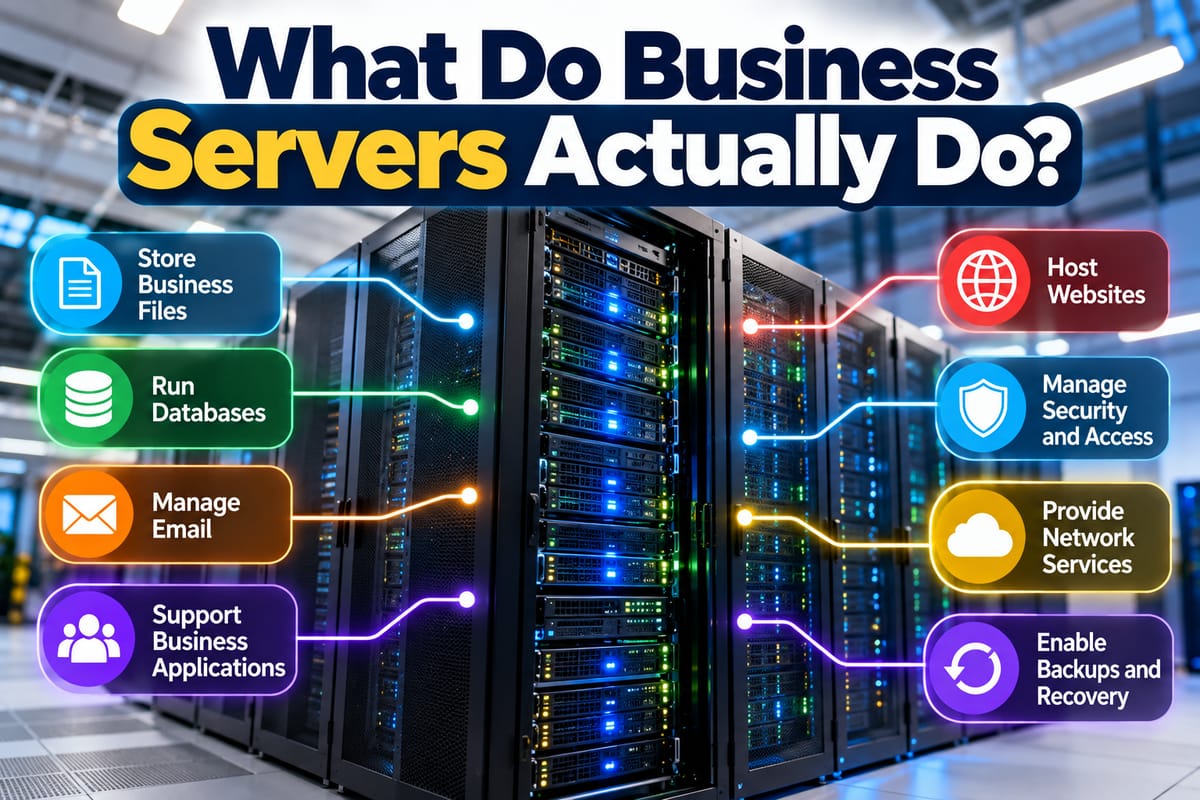
Servers can store files, run databases, host websites, manage email, authenticate employees, support business applications, coordinate network resources, and perform many other functions. Modern organizations may operate physical servers, virtual servers, cloud servers, or combinations of all three.
Understanding what servers actually do helps explain how business technology works behind the scenes and why reliable server infrastructure remains important even as organizations increasingly adopt cloud computing and software-as-a-service platforms.
What Is a Business Server?
A business server is a computing system that provides services or resources to other computers, applications, or users over a network.
The word "server" describes a role rather than a single type of machine. A server can be a powerful physical computer located inside a company's office, a virtual machine running on shared hardware, or a cloud-based computing environment operated by a technology provider.
For example, a company might use a server to:
- Store and organize business files
- Run a database
- Host an internal application
- Manage employee accounts
- Process transactions
- Host a website
- Manage network services
- Support backups
- Run business software
- Provide remote access to company resources
The server receives requests and performs tasks on behalf of users or other systems.
An employee opening a file from a shared company folder, for example, may be interacting with a file server without ever knowing where the physical hardware is located.
How Servers Work in a Business Environment
At a basic level, servers operate through a client-server relationship.
A client is a device or application that requests something. The server receives that request, processes it, and returns the appropriate information or service.
Consider an employee opening a customer record in a business application.
The employee's computer may send a request to an application server. The application server can then communicate with a database server, retrieve the required information, and send the result back to the employee's application.
The employee might see only a customer profile on the screen, while several server processes work behind the scenes.
This separation allows businesses to centralize important resources and control how users access them.
Servers Are Part of a Larger IT Infrastructure
A server does not operate in isolation. It normally forms part of a larger collection of hardware, software, networks, security controls, storage systems, and services.
Businesses that want to understand how these components fit together can explore the Complete Guide to IT Infrastructure for Businesses.
IT infrastructure can include:
- Servers
- Storage systems
- Network switches
- Routers
- Firewalls
- Computers
- Virtual machines
- Operating systems
- Business applications
- Databases
- Backup systems
- Security tools
- Cloud services
- Monitoring platforms
Servers provide computing and application services within this larger environment.
The exact role depends on what the organization needs.
What Types of Servers Do Businesses Use?
Businesses rarely use servers for just one purpose. Different server roles are designed to perform different functions.
File Servers
File servers provide centralized storage for documents and other business files.
Instead of keeping important files exclusively on individual employee computers, an organization can store them on a shared server.
Employees can then access authorized folders through the business network.
File servers can make it easier to:
- Centralize documents
- Control access permissions
- Organize company information
- Back up important files
- Manage shared resources
- Reduce dependence on individual computers
They are particularly useful when employees need to collaborate around shared documents and organizational data.
Database Servers
Database servers run database management systems and provide structured access to business data.
A company might use a database to store:
- Customer records
- Product information
- Orders
- Financial transactions
- Employee information
- Inventory records
- Business analytics data
When an application needs information, it can send a query to the database server.
The database server processes the request and returns the relevant data.
This architecture allows many applications and users to work with centralized information while applying controls around access and data management.
Application Servers
Application servers provide the computing environment required for business applications.
For example, an organization might have an internal application for managing inventory, processing customer orders, or tracking employee activities.
Rather than installing all of the application's processing components on every employee computer, much of the application logic can run on a centralized server.
This can simplify application management because updates and configurations can be handled centrally.
Web Servers
Web servers deliver websites and web-based content to users.
When someone visits a company's website, their browser sends a request to a web server. The server responds by providing the requested web content.
Businesses may operate web servers for:
- Public websites
- Customer portals
- Internal intranets
- Online applications
- E-commerce platforms
- Web-based business tools
Large websites may use multiple servers to handle traffic, improve reliability, and distribute workloads.
Email Servers
Email servers handle the delivery and storage of electronic messages.
Historically, businesses commonly operated their own email servers. Today, many organizations use hosted email services instead.
Even when a company does not physically operate its own email hardware, the underlying email service still depends on server infrastructure somewhere.
Authentication and Directory Servers
Businesses need a way to identify users and determine what resources they are allowed to access.
Authentication and directory services help manage employee identities, passwords, groups, devices, and permissions.
A centralized identity system can allow an organization to control access to multiple applications and resources from a coordinated system.
This becomes especially important as businesses grow and employees require access to increasingly large technology environments.
Servers Can Run Many Business Applications
One of the most important roles of business servers is running applications that support organizational processes.
A business application might handle:
- Accounting
- Human resources
- Inventory
- Customer relationships
- Manufacturing
- Sales
- Procurement
- Project management
- Communication
- Data analysis
In smaller organizations, one physical server might support several applications.
Larger organizations typically separate workloads across multiple servers or virtual environments.
This separation can improve security, performance, reliability, and manageability.
Physical Servers vs. Virtual Servers
A physical server is an actual computer containing processors, memory, storage, and other hardware.
Organizations can install an operating system directly on the physical machine and run applications on it.
Virtual servers work differently.
A physical machine can use virtualization software to create multiple virtual machines. Each virtual machine can behave like an independent server with its own operating system and applications.
For example, one powerful physical server might host several virtual servers:
- A database server
- An application server
- A file server
- A development server
Virtualization can make hardware resources more flexible because computing capacity can be allocated between different workloads.
It can also make it easier to create, move, back up, and manage server environments.
What Is a Cloud Server?
A cloud server is a server environment provided through cloud computing infrastructure.
Instead of purchasing and maintaining all of the underlying physical hardware themselves, businesses can obtain computing resources from a cloud provider.
Cloud computing can provide:
- Computing power
- Storage
- Networking
- Databases
- Application platforms
- Security services
- Backup capabilities
Organizations exploring this model can learn more through the Complete Guide to Cloud Computing for Business.
Cloud servers can be created and adjusted more quickly than traditional physical infrastructure in many situations.
Businesses may increase or decrease computing resources depending on workload requirements, although the exact flexibility depends on the cloud service being used.
Why Businesses Still Use Physical Servers
The growth of cloud computing has not eliminated physical servers.
Some organizations continue to operate servers in their own facilities because they need specific levels of control, performance, security, compliance, connectivity, or integration with existing systems.
Physical infrastructure can also make sense when workloads are predictable and an organization already has suitable facilities and technical expertise.
Businesses may also use a hybrid approach.
A company could operate some workloads locally while using cloud services for others.
This creates a technology environment in which physical servers, virtual servers, and cloud infrastructure can work together.
How Servers Support Business Networking
Servers depend heavily on networks because users and applications need a way to communicate with them.
An employee's computer might connect to a server through a local area network, while remote employees may access business systems through secure internet connections.
Networking determines how information moves between devices and services.
The Complete Guide to Business Networking provides broader context about how business networks connect computers, systems, users, and resources.
A well-designed network helps ensure that employees can reach the servers and applications they need while security controls restrict unauthorized access.
Servers and Business Security
Because servers often contain valuable information or provide access to important applications, protecting them is a major part of business cybersecurity.
Security measures can include:
- Access controls
- Strong authentication
- Network segmentation
- Firewalls
- Encryption
- Security monitoring
- Vulnerability management
- Software updates
- Malware protection
- Backup systems
- Logging and auditing
Server security is not simply about protecting the physical machine.
Organizations must also protect the operating system, applications, accounts, databases, network connections, and data handled by the server.
A compromised server can potentially affect many users and business processes at the same time.
Servers and Data Storage
Servers often act as centralized points for storing and managing organizational information.
However, storage does not necessarily mean keeping everything on the server's internal drives.
Businesses can use:
- Direct-attached storage
- Network-attached storage
- Storage area networks
- Cloud storage
- Distributed storage systems
- Database storage
The appropriate architecture depends on factors such as data volume, performance requirements, availability needs, cost, security, and recovery objectives.
For businesses, the important issue is not simply where information is stored. It is also whether employees and applications can reliably access it when required.
Servers and Backups
Servers can play an important role in business backup strategies.
A backup system creates additional copies of important information so that data can potentially be recovered after accidental deletion, hardware failure, software problems, or security incidents.
A business might back up:
- Databases
- Application data
- Shared files
- Server configurations
- Virtual machines
- Critical business systems
Backups should not be confused with simply keeping data on another disk.
An effective recovery strategy considers whether backups are accessible, protected from unauthorized changes, and capable of restoring the systems the business actually needs.
How Businesses Keep Servers Available
For some businesses, server downtime can interrupt important operations.
If employees cannot access an application server, for example, they may be unable to complete certain tasks.
Organizations can improve availability through technologies and practices such as:
- Redundant hardware
- Multiple servers
- Load balancing
- Failover systems
- Replicated databases
- Backup power
- Monitoring
- Automated alerts
- Disaster recovery systems
Not every business requires the same level of availability.
A small internal application may tolerate occasional downtime, while a system responsible for continuous transactions may require much stronger redundancy.
The goal is to match server availability with the importance of the business service being provided.
Server Performance Matters
A server must have sufficient resources for its workload.
Important performance resources include:
- CPU capacity
- Memory
- Storage performance
- Network bandwidth
- Database performance
- Application efficiency
A server with inadequate resources can become a bottleneck.
For example, if an application receives more requests than its server can process efficiently, users may experience slow response times.
Businesses can address these problems by optimizing applications, increasing available resources, distributing workloads across multiple servers, or moving workloads to a different infrastructure model.
Server Monitoring and Maintenance
Servers require ongoing management.
IT teams may monitor:
- CPU utilization
- Memory usage
- Disk capacity
- Network activity
- Application performance
- Error logs
- Security events
- Hardware health
- Service availability
Monitoring helps technical teams identify problems before they become major disruptions.
Maintenance can include installing security updates, replacing failing hardware, updating applications, reviewing access permissions, checking backups, and removing unnecessary services.
A server that works correctly today still needs ongoing attention because its software, workload, and surrounding technology environment can change.
How Servers Fit Into Enterprise Technology
As organizations grow, their technology environments become increasingly interconnected.
A large organization might use servers to support finance systems, customer management platforms, supply chains, employee services, analytics, communications, and other business functions.
These systems may exchange information with one another rather than operating independently.
This is part of the broader world of enterprise technology and integrated technology systems.
Enterprise environments can involve many servers and services working together.
A customer transaction, for example, could involve a web server, application server, database, authentication system, payment service, logging platform, and analytics system.
The customer may experience the process as one application, even though many separate systems are involved behind the scenes.
Do All Businesses Need Their Own Servers?
No.
A business does not necessarily need to purchase and operate physical servers itself.
Cloud platforms, hosted applications, managed services, and software-as-a-service products allow organizations to consume computing resources without maintaining all of the underlying hardware.
A small company might rely almost entirely on hosted services.
A larger organization might operate a combination of:
- Local physical servers
- Virtualized infrastructure
- Private cloud environments
- Public cloud services
- SaaS applications
- Managed technology services
The appropriate approach depends on business requirements rather than the simple question of whether servers exist.
Even when an organization does not own a physical server, it may still depend on servers operated by its technology providers.
Servers Are About Services, Not Just Hardware
It is easy to think of a server as simply a powerful computer sitting in a data center.
That description misses the bigger picture.
A server's real purpose is to provide a service.
That service could be storing a file, processing a database query, authenticating an employee, hosting an application, delivering a website, or supporting another system.
The hardware is the platform that makes the service possible.
This distinction becomes particularly important in modern cloud environments. A business can consume computing services without knowing which physical machine processes its workload.
The underlying hardware still exists, but the business interacts primarily with the service rather than the physical device.
The Role of Servers Is Changing
Business computing continues to evolve.
Traditional server rooms have increasingly been complemented by virtualization, cloud computing, managed services, containers, distributed systems, and serverless architectures.
These technologies change how computing resources are delivered and managed, but they do not eliminate the fundamental need for computing infrastructure.
Business applications still need processing power, memory, storage, networking, and data services.
The difference is increasingly about where those resources run and how much responsibility the business has for managing them.
Why Understanding Servers Still Matters
Even employees who never touch a server directly benefit from understanding what servers do.
Servers influence whether applications are available, whether files can be accessed, whether databases respond quickly, and whether business systems can communicate with each other.
For managers and business leaders, understanding server infrastructure can also make technology decisions easier to evaluate.
Questions about cloud migration, application performance, cybersecurity, backup strategies, infrastructure costs, and business continuity often depend on how server resources are provided.
The modern business may never need to walk into a server room, but servers remain an important part of the computing systems that keep organizations running.
From a small office storing shared documents to a multinational organization processing millions of transactions, the basic role remains consistent: servers provide computing services that other users, devices, and applications depend on.