Difference Between Building Custom Software and Buying Existing Software
When a business needs new software, one of the biggest technology decisions is whether to build a solution from scratch or buy an existing product.
At first, buying software can appear to be the simpler option. A company can select a product, pay for a subscription or license, configure the available settings and begin using it. Building custom software, by comparison, requires planning, development, testing, maintenance and ongoing investment.
But the decision is rarely that simple.
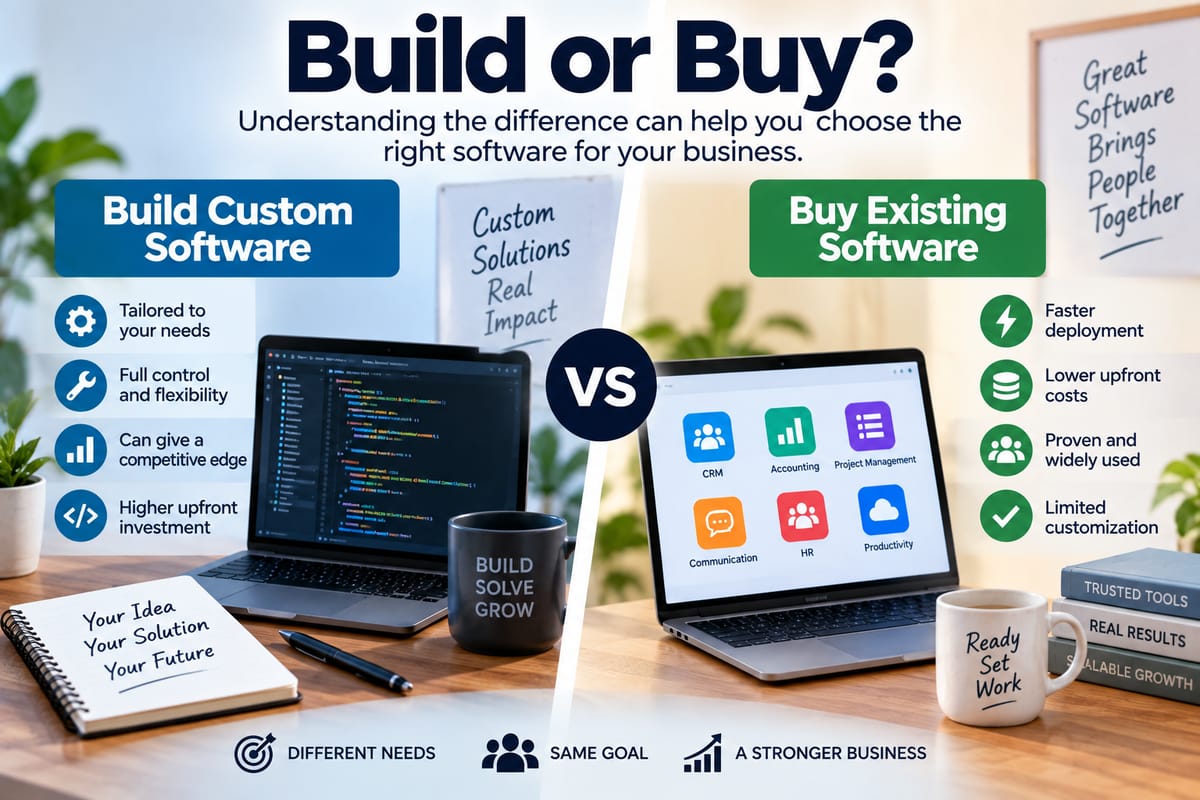
Existing software may offer proven features, faster deployment and predictable pricing, while custom software can provide greater control over functionality, workflows, integrations and long-term development. The right choice depends on what the organization actually needs, how unique its requirements are and how much time and money it is prepared to invest.
Understanding the difference between the two approaches can help businesses make more informed technology decisions.
What Is Custom Software?
Custom software is an application specifically designed and developed for a particular organization, group of users or business process.
Instead of adapting an existing product to fit the company's workflow, developers create the software around defined requirements. Those requirements can include everything from the user interface and database structure to integrations, security controls, reporting systems and automation.
For example, a logistics company might build a custom platform that combines vehicle tracking, driver scheduling, inventory management, customer notifications and billing into one system.
A general-purpose product may provide some of these capabilities, but custom development allows the company to determine how they work together.
Custom software can be developed internally by an organization's technology team or by an external software development company.
The development process typically involves requirements gathering, planning, architecture, design, coding, testing, deployment and maintenance. Understanding the different stages is useful when evaluating the investment involved in custom development, particularly when comparing it with ready-made products. A complete guide to software development processes provides a broader look at how software moves from an initial idea to a working product.
What Is Existing Software?
Existing software, sometimes called off-the-shelf or commercial software, is developed for a broad market rather than for one specific organization.
Examples include accounting applications, customer relationship management platforms, project management tools, communication applications, payroll systems and office productivity software.
The provider develops the product and makes it available to multiple customers. Businesses generally pay through subscriptions, licenses or other pricing models.
Rather than creating the underlying software themselves, customers configure the product to suit their operations.
This approach can significantly reduce the amount of technical development required before employees can start using the application.
The Biggest Difference: Customization
The most obvious difference between the two approaches is the degree of customization.
Custom software is designed around the organization's requirements. Developers can create specific features, workflows and integrations that may not exist in commercial products.
Existing software works differently. It has a predetermined feature set, although many products provide configuration options, plugins, application programming interfaces and integrations.
This means businesses using commercial software often have to adjust some of their processes to fit the application.
That is not necessarily a disadvantage. Standardizing processes around established software can sometimes simplify operations. Problems arise when the differences between the software and the organization's needs become large enough to create inefficiencies.
Cost: Custom Development vs. Software Purchases
Cost is another major consideration.
Buying existing software generally requires less upfront investment. A company might pay a monthly or annual subscription and then incur additional costs for implementation, training, premium features, storage or support.
Custom software usually requires a larger initial investment because developers must design and create the system before it can be used.
However, comparing only the initial price can produce a misleading picture.
A commercial application may require recurring subscription payments indefinitely. A business may also need to pay for additional users, advanced features, integrations or customization.
Custom software can have higher development costs but potentially provide greater control over future expenses, particularly when the system becomes an important part of the company's operations.
The relevant question is therefore not simply which option is cheaper. Businesses need to consider the total cost of ownership over the expected lifespan of the software.
Speed of Deployment
Existing software generally has an advantage when speed matters.
A business can often create an account, configure the application and begin using it relatively quickly. More complex implementations may require data migration, employee training and integration work, but the underlying product has already been developed.
Custom software takes longer because the application must be designed and built.
The timeline can range from a relatively small project to a large, multi-year technology initiative depending on the complexity of the requirements.
For organizations facing an immediate operational problem, an existing product may therefore be more practical.
For businesses with long-term requirements that cannot be adequately addressed by available products, the additional development time may be justified.
Flexibility and Control
Custom software gives an organization considerably more control over how its technology works.
The business can influence:
- Features
- User interfaces
- Workflows
- Data structures
- Integrations
- Automation
- Reporting
- Access controls
- System architecture
- Future development priorities
This level of control can be particularly valuable when software is closely connected to a company's competitive advantage.
With commercial software, control is more limited.
The vendor determines the product roadmap, release schedule and core functionality. Customers can provide feedback or request features, but they generally cannot dictate exactly what the provider develops next.
Software Architecture Matters
The architecture behind an application can have a major impact on its ability to grow and adapt.
Software architecture determines how different components of an application are organized and how they communicate with one another. It can influence scalability, security, maintainability, performance and integration capabilities.
This becomes particularly important when comparing custom and existing software.
A custom application can be architected around the organization's specific technical requirements from the beginning. Developers can select an approach that supports expected workloads, integrations and future expansion.
An existing application comes with an architecture selected by its vendor. Customers generally work within those technical boundaries.
Businesses evaluating custom development can benefit from understanding how software architecture organizes applications, especially when considering whether a new system needs to integrate with existing technology.
Integration With Other Systems
Modern businesses rarely rely on a single software application.
Accounting systems may need to communicate with payment platforms. Customer management systems may exchange information with marketing tools. E-commerce platforms may need connections to inventory, shipping and financial systems.
Existing software may already provide integrations with popular platforms. This can make implementation easier.
However, organizations with unusual systems or specialized workflows may encounter limitations.
Custom software can be designed with specific integrations in mind. Developers can create connections between systems that commercial products may not support directly.
The downside is that custom integrations also create additional development and maintenance responsibilities.
Security Considerations
Security is important regardless of which approach a business chooses.
Commercial software providers often have dedicated teams responsible for security updates, vulnerability management, infrastructure protection and monitoring. Customers can benefit from that expertise without having to build everything internally.
However, businesses still need to configure the software correctly and manage user permissions, authentication and access controls.
With custom software, the organization has greater control over security architecture and data handling, but it also takes on more responsibility.
Developers must design appropriate security controls, monitor vulnerabilities, update dependencies and respond to emerging threats.
Custom development therefore does not automatically mean better security. The quality of the development and maintenance practices matters considerably.
Maintenance and Updates
Every software application requires maintenance.
Commercial software is maintained by its vendor. Updates may introduce new features, fix bugs, improve performance or address security vulnerabilities.
This can reduce the amount of technical maintenance required from the customer.
However, updates can sometimes change interfaces, remove features or affect integrations. Organizations have limited control over when and how major changes occur.
Custom software gives the organization more control over its development roadmap. It can decide which features should be changed or added.
But that control comes with responsibility.
The company must fund and manage ongoing maintenance, including bug fixes, infrastructure changes, security updates, compatibility work and future development.
Vendor Dependence
Buying existing software often creates a relationship with a vendor.
That relationship can provide useful benefits, including customer support, technical documentation, regular updates and professional services.
At the same time, the business becomes dependent on the provider's decisions.
Changes to pricing, product direction, licensing terms or feature availability can affect customers.
Custom software can reduce dependence on a commercial software vendor, particularly when the organization controls the source code and infrastructure.
However, custom applications can create a different form of dependency. If only a small number of developers understand the system, the organization may become dependent on those individuals or the development company that created it.
Good documentation and maintainable architecture can help reduce this risk.
Scalability
Businesses also need to consider how their software requirements may change over time.
An existing application may already be designed to serve thousands or millions of users, making it attractive to growing organizations. Cloud-based commercial platforms can often scale infrastructure without customers having to manage the underlying systems.
Custom software can also be designed for scalability, but the organization must make those architectural decisions during development and continue investing in the system as requirements grow.
The important consideration is whether the software can accommodate future users, transactions, data volumes and integrations without creating unacceptable costs or performance problems.
Employee Training
Existing software can sometimes be easier to introduce when employees are already familiar with similar products.
Widely used applications may also have extensive documentation, training materials and user communities.
Custom software can be designed around the organization's workflows, potentially making it more intuitive for employees who use those workflows every day.
However, employees still need training, particularly when the system introduces new processes.
The quality of the user experience can matter as much as the underlying technology.
How Businesses Should Evaluate the Choice
There is no universal answer to whether companies should build or buy software.
The decision should begin with the organization's actual requirements rather than a preference for one technology strategy.
Businesses can examine questions such as:
- What problem does the software need to solve?
- Are suitable commercial products already available?
- How closely do those products match the company's workflows?
- How much customization is required?
- How quickly is the software needed?
- What is the expected total cost over several years?
- How important is control over the product roadmap?
- What integrations are necessary?
- How sensitive is the data involved?
- How many employees will use the system?
- How quickly might usage grow?
- Does the software support a strategically important business process?
A structured evaluation can prevent organizations from choosing software simply because it appears inexpensive or technically impressive.
Businesses considering a commercial product can also benefit from understanding how businesses evaluate and purchase technology solutions, particularly when multiple departments and stakeholders are involved in the purchasing decision.
When Buying Existing Software May Make Sense
Existing software can be a practical choice when the organization needs a standard capability that is already well served by the market.
Examples might include:
- Email and collaboration
- Accounting
- Payroll
- Basic project management
- Document management
- Customer relationship management
- Video conferencing
- General productivity
- Standard inventory management
If the software meets most requirements without extensive customization, purchasing it can allow the organization to focus resources on its core business rather than software development.
It can also provide access to mature features and established support systems.
When Custom Software May Make Sense
Custom development becomes more attractive when a company's requirements are highly specialized.
This may occur when:
- Existing products cannot support essential workflows
- The organization needs unusual integrations
- Software is central to a competitive advantage
- Existing applications create significant operational inefficiencies
- The business needs extensive control over data or functionality
- Commercial products impose limitations that cannot reasonably be worked around
- Long-term requirements are expected to differ substantially from standard market offerings
In these circumstances, adapting business processes around an existing application may be more expensive or restrictive than developing a purpose-built system.
The Hybrid Approach
Businesses do not always have to choose entirely between building and buying.
A hybrid approach can combine commercial software with custom components.
For example, a company might purchase a commercial accounting platform while developing its own customer portal and integrating the two systems.
Another organization might use a commercial customer relationship management platform but build custom automation around it.
This approach can provide access to mature commercial capabilities while allowing the business to customize areas where its requirements are particularly specialized.
The challenge is ensuring that the resulting technology environment remains manageable.
Too many integrations and custom components can create technical complexity that becomes difficult to maintain.
Build vs. Buy Is Really a Business Decision
The build-versus-buy question may sound like a technology decision, but its consequences extend far beyond the IT department.
The choice can affect operating costs, employee productivity, customer experiences, security responsibilities, business processes and long-term flexibility.
Buying existing software can provide speed and access to established functionality. Building custom software can provide greater control and the ability to create highly specialized capabilities.
Neither approach is automatically appropriate for every organization.
The most useful starting point is to clearly define the business problem, identify the capabilities required and compare the long-term implications of each option. When companies evaluate technology in terms of both immediate requirements and future needs, the decision becomes less about choosing between “build” and “buy” and more about selecting the software strategy that fits the way the organization actually operates.